
OICN Study: How Do Our Collaborative Practices Drive Information Overload?

.svg)
Information overload – also known as cognitive overload – is an increasingly common challenge in the workplace. But what exactly does it mean? The term refers to the overabundance of information we are constantly bombarded with and are unable to process effectively. At work, this can manifest as a high volume of emails to manage, too many meetings, or simply an overwhelming number of notifications!
Where does information overload come from? What impact can it have on the organization and its employees? And what collaborative best practices can be put in place to tackle information overload at work? These are the questions explored by the 2023 annual benchmark of the Observatoire de l’Infobésité et de la Collaboration Numérique (OICN).
Here is a summary of the key takeaways from this study.

Where Does Information Overload at Work Come From?
People often say that information overload in the workplace is linked to our digital tools. And yes, that is not entirely wrong — but when you dig deeper into the problem, you quickly realize it is only the tip of the iceberg. The hidden part plays a far more significant role. That hidden part is, of course, our collaborative practices — the way we work and the way we use our collaboration tools.
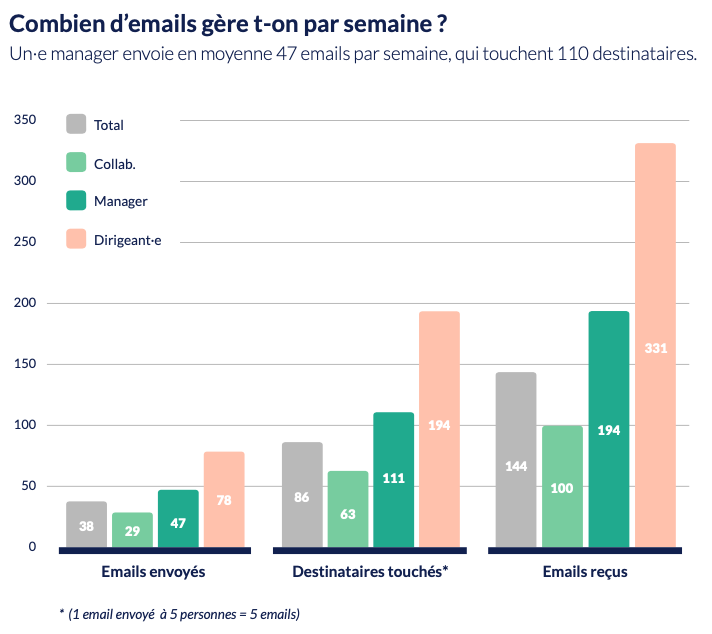
Looking at the OICN study, it is clear that these collaborative habits are still poorly adapted in many organizations. On average, an employee receives about 29 emails per day, nearly two-thirds of which are internal emails! What’s more, email is increasingly being used for instant messaging — even though it was designed for external and asynchronous communication. Other tools, such as collaborative platforms and enterprise social networks, are far better suited for that purpose — as long as they are not overused.
Read also: Should You Use Email for Internal Communications?
Indeed, if not used appropriately, these collaborative tools can also generate information overload. This is especially true of video conferencing solutions and instant messaging apps.
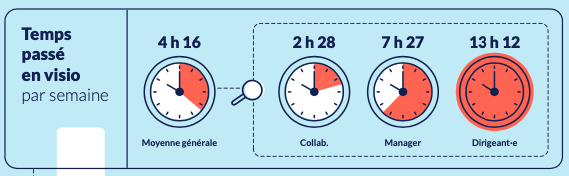
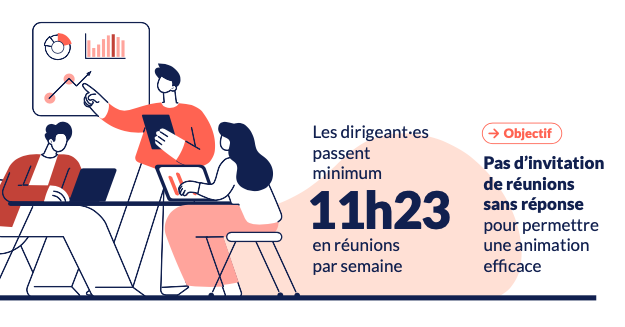
On average, we spend 4 hours and 16 minutes in video meetings every week. That figure grows with seniority: while an individual contributor spends 2h28 in video calls per week, a manager spends 7h27, and a senior executive spends more than 13 hours!
A key contributing factor is not only the sheer number of meetings, but also their length. 63% of meetings last more than one hour, which only amplifies the phenomenon of meeting overload.
What Is the Impact on Employees, the Organization, and the Environment?
These poor collaborative practices come at a real cost. Here is an overview of the risks posed by information overload.
An Ever-Growing Mental Load
Did you know? 70% of employees interrupt their work when they receive a notification. Sometimes out of curiosity, but most often out of fear of missing something important — a phenomenon known as FOMO (fear of missing out).
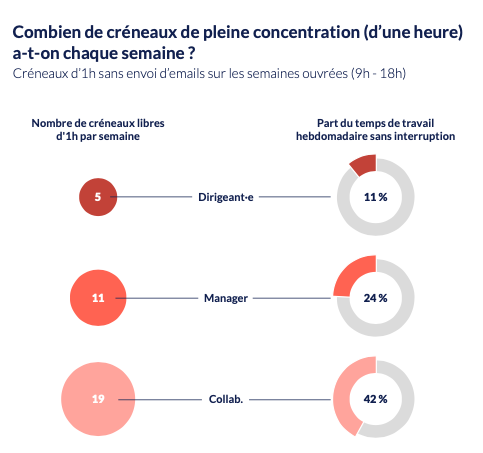
These repeated interruptions create a heavy mental load and prevent us from fully focusing on the tasks at hand. This — in fine — limits team productivity. The phenomenon is particularly visible among senior leaders, who manage to carve out only 5 uninterrupted hours per week.
Beyond notifications, the overflow of emails and meetings also contributes to mental load. This is illustrated by the following key figures:
- 74% of executives cannot keep up with their emails
- 15% of meetings are scheduled with less than 30 minutes between them, and 21% overlap
To make up for lost time, many employees find themselves multitasking — answering emails during meetings, for instance. This increases cognitive fatigue and creates even more mental load. Breaking out of this vicious cycle is no easy feat.
Increased Psychosocial Risks
Greater mental load also means a rise in increased psychosocial risks (PSR) — work situations that pose a risk to the mental and physical health of employees. Workplace stress is one of the most common PSRs: according to an ADP study, 67% of French workers experience it at least once a week.
Several factors can worsen workplace stress, including:
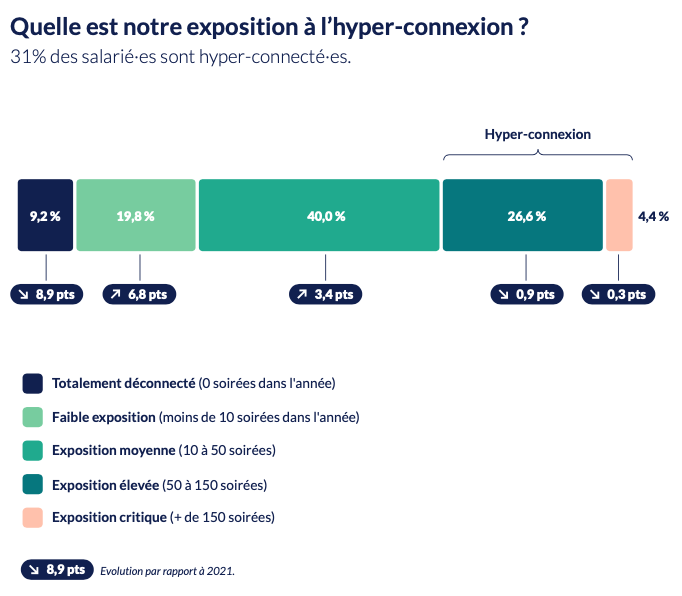
- Hyper-connectivity, meaning staying connected outside of regular working hours. 31% of employees are affected.
- Hyper-reactivity, meaning the tendency to respond very quickly to new messages and requests. This is already widespread: more than half of all emails receive a reply within an hour, and 17.8% within five minutes.
The growing use of digital tools can also have the opposite effect on workers who rarely or never use them (particularly those in frontline roles), leading to digital isolation. According to the OICN, 12.3% of employees interact with fewer than 10 different people per week and are therefore at risk of feeling socially isolated.
A Significant Carbon Footprint
It’s easy to forget, but our digital habits have a real environmental impact. Counting emails and associated file storage alone, a single employee generates an average of 7.1 kg of CO2 equivalent per year. Emails are far more than just text: they often include attachments and are sent to multiple recipients, which compounds their carbon impact.
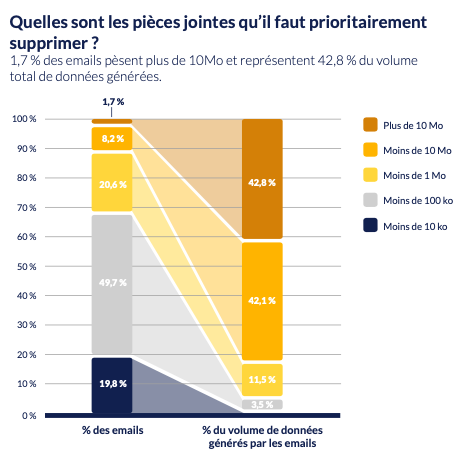
Many emails contain no attachments at all — yet those that do carry a heavy environmental weight. Case in point: emails over 10 MB account for 42.8% of our total data volume generated, yet represent only 1.7% of our total email count!
What Collaborative Best Practices Can Reduce Information Overload?
If we want to limit psychosocial risks and the environmental footprint of digital work, now is the time to act. Here are some collaborative best practices to adopt to reduce information overload in the workplace.
Better Email Habits
The first step toward tackling information overload? Reducing email use and setting clear usage rules to prevent overuse, for example:
- Reserve emails for external and asynchronous communications, and opt for an enterprise social network or collaboration tool for internal exchanges
- Pick up the phone if you have sent more than 3 emails to the same person
- Schedule emails to be sent during working hours
- Limit the number of people in CC: 30% of our emails come from this practice — yet to be efficient, an organization should aim for less than 20% of emails in copy.
- Avoid using “reply all” when it is not necessary (this practice generates 25% of our emails!)
- Assess the digital workload for each role and ensure no employee has to manage more than 100 emails per day
- Check emails only during designated time windows, to stay focused on your work
- Set up rules to filter and prioritize emails to save time when processing them
- Cap the retention period for emails and limit attachments to reduce their carbon footprint
Fewer Meetings — and More Effective Ones
Meetings, and especially video conferences, are often a source of information overload at work. To avoid this, it is important both to hold fewer meetings and to make meetings more effective so they run shorter.
Here are some collaborative best practices to give your employees more breathing room and boost productivity:
- Clarify the objective and agenda of every meeting in advance
- Let employees know they can always decline a meeting invitation if the topic does not concern them, or if they already have a conflicting commitment
- Where possible, leave buffer time between meetings to prevent back-to-back scheduling
- Limit meetings scheduled during the lunch break
- Ban phone use during meetings
- Encourage employees to block focus time on their calendars where no meetings can be scheduled

Smarter Use of Collaboration Tools
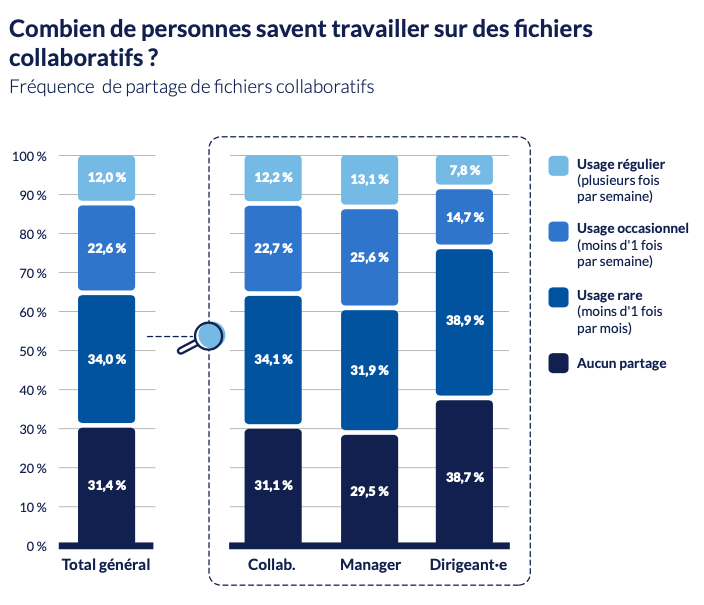
With the rise of hybrid work, collaboration tools have become essential in the workplace. Yet they are not always used optimally. 90% of employees do not use them on a regular basis, which underscores the need to evolve our collaborative practices.
To drive adoption and maximize the use of these tools, we recommend:
- Creating groups to organize information and streamline communication
- Establishing information governance to clarify how information is shared across the organization and which tools should be used for which purpose
- Setting communication ground rules within teams (for example, defining what should be a published post vs. a chat message)
- Asking teams to configure their notification settings and enable “do not disturb” mode when they need to focus
- Training employees on these tools using concrete use cases (for example, co-editing collaborative documents for project work, sharing posts in groups for internal communications, etc.)
Leading by Example at the Management Level
Finally, do not forget: none of this is possible unless leadership and managers model the behavior themselves. It is therefore essential that they, too, apply the best practices outlined above to encourage their teams to do the same.
All too often, this is far from the case. Case in point: executives reconnect in the evening on 117 days of the year. They are also the least frequent users of chat, favoring email instead. As a result, 89% of their working time is disrupted by emails!
To prevent hyper-connectivity and hyper-reactivity, it is important that managers and executives…
- implement — and personally practice — the right to disconnect,
- clarify with their teams what is truly urgent and what is not,
- assess the workload and email volume their employees must manage, and size their teams accordingly.

Talkspirit: The Collaboration Platform That Helps Fight Information Overload
The market is full of collaboration tools. But have you heard of Talkspirit? 100% made in France, this all-in-one platform brings together in one place all the features you need to communicate and collaborate on a daily basis: chat and video conferencing, news feed, workgroups, office suite, drive, project management, and more.
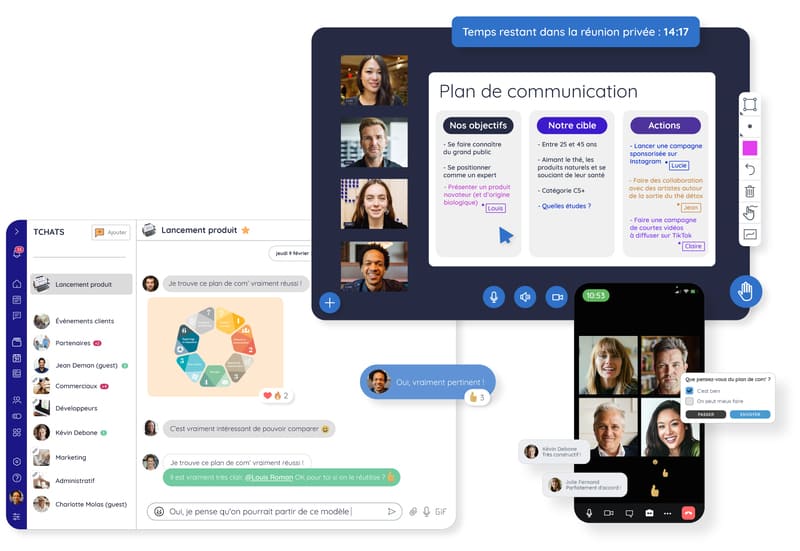
With Talkspirit, your employees no longer need to juggle dozens of tools at once, and can find the information they need in just a few clicks. They can also customize their notifications and enable “do not disturb” mode to avoid being interrupted outside their regular working hours — which helps improve their work experience and reduce information overload in the workplace.
And the good news is that you can try Talkspirit for free!
*
* *
Conclusion
You now have a solid overview of where information overload at work comes from, the impact it can have on your employees and the environment, and the collaborative best practices and tools to put in place to tackle this challenge.
You may be wondering: how can you tell if you and your team are suffering from information overload? If so, no worries — simply take this quiz 👇
Take the Test
Answer our quiz “Are you suffering from information overload at work?” to see where you stand and get practical tips on how to better manage the flow of information you face every day.



