
How to Train Your Teams on a New Digital Tool

.svg)
A lack of training is one of the key factors that hinders the adoption of a new digital tool. This is what more than a quarter of employees surveyed in the latest Intranet Observatory barometer. Now indispensable, these digital platforms help us in many areas — from internal communication and collaborative work to HR management and process automation. Yet training employees on these tools is often a challenge, or simply insufficient for them to make the most of the platform.
So what is the best way to train your teams on a new digital tool? And how can you ensure users actually get to grips with it? Here are our top tips for building truly effective training programs ✨

1. Involve employees from the very start of the project
Digital tool adoption begins well before deployment! It is essential to involve employees from the very beginning of the project. In practice, this means:
- informing your teams that you plan to roll out a new tool,
- explaining why you need this tool now, and what goals you are aiming to achieve,
- gathering feedback from everyone on the project (both expectations regarding the tool and potential barriers to adoption),
- involving employees in selecting the solution (for example, inviting them to test the chosen tool alongside you, or even to become brand ambassadors for it).
The clearer and more transparent your communication, the more invested your teams will feel in the project — and the easier it will be to train them on your new digital tool once deployment begins.
Read also: How to Set Up an Enterprise Social Network?
2. Build an ambassador network
Les Ambassadors are THE cornerstone of your training plan. Their shared goal: driving adoption of your new digital tool. Depending on their expertise, they can be tasked with:
- spreading the word about the platform launch,
- gathering employee needs,
- addressing any doubts and concerns,
- training colleagues on the new digital tool,
- sharing best practices,
- and leading by example on the platform.
Ambassadors often have close relationships with their colleagues. This gives them significant influence on the ground, which can then ripple outward through word of mouth. Make sure to loop them in whenever you roll out new tools!
Don’t have ambassadors yet? Check out our tips for building your network in this article 👇
Read also: Turn Your Employees Into Ambassadors for Your Enterprise Social Network!
3. Establish information governance
Before training your teams on a new digital tool, you first need to establish information governance — that is, clarify your processes for creating, storing, and sharing information. This approach is essential if you want to put your organization’s knowledge to good use, including your training resources!
It will notably help define:
- What information to share on which tools? For example, your training processes can be formalized in a knowledge base, while breaking news will be better suited to the news feed of your enterprise social network.
- What processes are linked to your digital tools? These may include processes for training employees on a new digital tool, as well as other business processes connected to these platforms (e.g., how to monitor updates, how to share information, etc.).
- What are the usage rules for these tools? If you have a collaborative platform, you will need to clarify what types of information should be shared on which communication channels, who should be part of which groups, and who should manage them.
- How do your various digital tools interact? For example, are certain integrations planned to facilitate the flow of information from one tool to another?
Thanks to this information governance, every employee knows where to find the information they need (such as training documents for your new tool), how to use it, who to share it with, and how to suggest creating new resources. A solid foundation to build on!
Read also: Why Set Up Governance on Your Enterprise Social Network?
4. Centralize your resources
You now know where, when, and how to share information and documents related to digital tool training. The next step is to centralize all your training resources, so that employees can access them easily.
Our recommendation: bring them together on a shared knowledge base. This is exactly what you can do with the Talkspirit Library, which lets you:
- create and format content pages and subpages,
- feature them on a homepage,
- manage access rights to these pages (including who can edit or view the content).
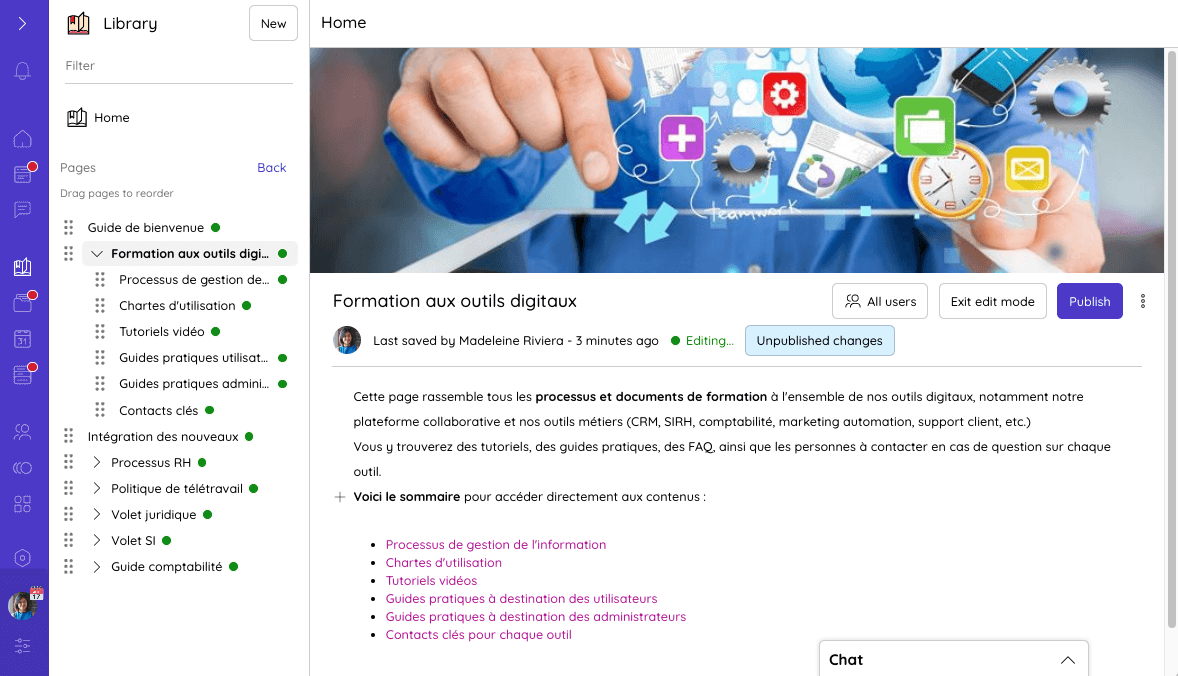
Centralizing training resources in the Talkspirit Library
In practice, to centralize your training resources in this library, simply create a main page, add a table of contents, then create subpages for each piece of content, such as:
- your tools’ usage guidelines
- associated processes,
- step-by-step tutorials for learning how to use these tools,
- webinars and practical guides highlighting best practices by role, for both users and administrators,
- a FAQ covering questions and answers commonly asked by employees about each tool.
5. Offer personalized training
You simply cannot train your teams on a new digital tool without… actually running training sessions! This step is critical for helping employees get to grips with the platform and embedding lasting habits.
Ideally, training sessions should be organized from the moment your tool launches or even just before deployment. Sessions should be as practical as possible to quickly demonstrate the value the new tool brings. Don’t hesitate to use concrete examples to illustrate your points!
Some parts of the training can be generic (for example, when highlighting features that everyone will use). However, if your new tool serves multiple departments (HR, internal communications, IT, sales, etc.), it may be worthwhile to tailor the training more specifically.
If you are rolling out a collaborative platform like Talkspirit within your organization, you can highlight different features depending on the audience you are addressing:
- For internal communications teams: the welcome portal and the news feed, which help share company news and successes.
- For sales teams: workgroups and project management boards, which help share and allocate leads.
- For customer support: integrations with business tools, which enable automatic notifications of new tickets and prompt responses.
6. Encourage reverse mentoring
Does your company bring together employees from multiple generations (baby boomers, Gen X, Y, Z)? Leverage that diversity by experimenting with reverse mentoring !
This learning method involves pairing junior mentors with senior employees in the company, to facilitate knowledge transfer on topics where younger colleagues tend to be more comfortable — especially digital tools!
Practicing reverse mentoring can therefore be an excellent initiative to help employees who are less comfortable with digital tools, while also giving them the opportunity to bond with younger colleagues.
The initiative can come from leadership or from the business units themselves, but it should never feel like an obligation. What matters most is to provide structure and clear processes, so that junior mentors feel supported and can prepare these sessions under the best possible conditions.
Interested in reverse mentoring? Here is a video to learn more 👇
*
* *
Training your teams on a new digital tool can take anywhere from a few hours to a few months — it all depends on the tool’s complexity and the target audience. But rest assured: it is time well spent ! It is far better to invest in training upfront and ensure your platform is widely adopted than to have to switch tools a few months later because employees never got to grips with it.
Of course, training is not the only factor that will help drive digital tool adoption. Choosing an ergonomic, easy-to-use platform is equally essential for saving time. Watch the replay of our webinar “6 Key Steps to Boost Adoption of Your Collaborative Software” for more best practices:



