
How can you reduce information overload associated with work tools?

.svg)
- Information overload occurs when the amount of information received exceeds the capacity to process it. 80% of employees worldwide experience it at work.
- The causes sit in five families: the information itself, the person receiving it, the tasks, the organisational processes and the digital tools.
- It has a documented cost: strain and burnout, lower job satisfaction, performance losses where work is interrupted, poorer decisions.
- Seven practices reduce it: streamline applications, limit internal email, keep meetings to a minimum, turn off notifications, filter the flow, organise and prioritise tasks, try a digital detox.
- Interventions that work operate on two levels: behaviour (email habits, prioritisation, notification-free slots) and structure (tool selection, channel rules, automated filtering).
- No practice holds on its own: IT picks the tools, internal communication and managers set the rules, each employee tunes their own notifications.
In today’s work world, 80% of employees worldwide experience information overload, a surplus of information that they are not able to process.¹ The cause: the constant drizzle of data coming from our digital tools. In the long run, this barrage of information can reduce our productivity, ability to concentrate, and stress.
Chat messages, news feed posts, internal emails, video conferences, collaborative documents: such has become the daily life of most office workers. There are multiple tools that each generate a huge amount of information. This makes it difficult to analyze all the data without getting overwhelmed. Hence the emergence of the phenomenon of information overload, also called infobesity.
So, how can organizations reduce this information overload? And how can we best use our work tools to limit the flow of information they generate?
Discover our 7 best practices to stop the infobesity linked to our digital tools.
Contents
- What information overload actually is
- 1. Streamline applications
- 2. Limit internal email
- 3. Keep meetings to a minimum
- 4. Turn off notifications
- 5. Filtering the information flow
- 6. Organize and prioritize your tasks
- 7. Try a digital detox
- To conclude
What information overload actually is
Information overload occurs when the amount of information exceeds the processing capacity of the person receiving it. That is the definition used by the review by Arnold, Goldschmitt and Rigotti (Frontiers in Psychology, 2023), which describes an inverted U curve: up to a point, more information improves a decision; past that point, the same information degrades it. The problem is not the volume as such, but the gap between that volume and what a person can absorb.
The review places the causes in five families, which is why no single measure fixes it:
- the information itself: its quantity, but also its quality, complexity, ambiguity and novelty;
- the person receiving it: experience, skills, familiarity with the tools;
- the tasks: routine work and complex work do not saturate at the same rate;
- the organisational processes: who decides what, who has to be kept informed, what rules govern the exchanges;
- the digital tools: which ones are deployed, and above all how they are rolled out.
Multilingual teams have one more lever. When the working day runs in Dutch, French and English, deciding which language a given channel carries is part of reducing the noise, and it costs nothing to settle.
The cost is documented: strain and burnout, lower job satisfaction, performance losses, particularly where work is interrupted, poorer decisions and health complaints. Effective interventions fall into two levels: behavioural change (email habits, prioritisation, notification-free slots) and structural change (tool selection, clear rules on which channel carries what, automated filtering). The seven practices below cover both.
1. Streamline applications
The first step to reducing employee information overload is to reduce the number of tools they regularly use. Today, more than a quarter of employees have to go through at least 11 applications to get the information they need to work.¹ That’s huge, especially when you consider that some applications are used for the same purpose.
Indeed, it’s not uncommon to see companies using several tools with similar functions just to make video conferences, chat with colleagues, or store documents. This multiplication of applications can be a real nuisance for employees, who have to spend their time juggling between different tools to pinpoint the right information.
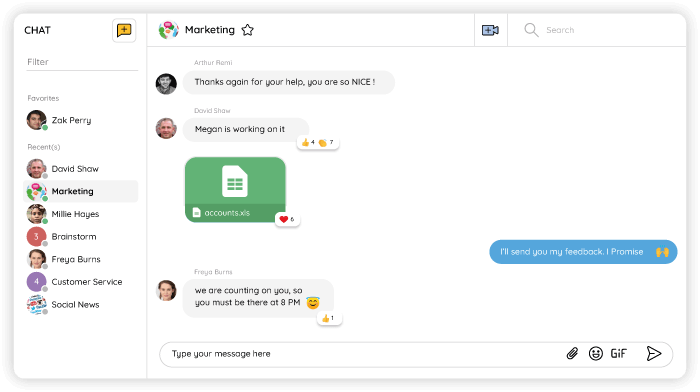
To avoid the information overload that’s tied with too many tools, rationalize your applications and opt for solutions that centralize several functions in the same place. This is precisely what Talkspirit proposes: an all-in-one collaborative tool that integrates chat, a videoconference module, cloud storage, a knowledge base, a news feed, and more.
2. Limit internal email
According to Forbes, an office worker spends about 2.5 hours a day reading and answering emails. That’s time that could be greatly reduced if we just limit email for internal exchanges.
Enterprise social networks, intranets, digital workplaces: numerous solutions exist to make information sharing more fluid and allow organizations to do without all the internal email.
Specialized in editorial communication, the Bergamote Agency has decided to replace its internal emails with the Talkspirit platform. Result: internal emails have decreased by 95% within the agency!
In addition to reducing internal email, you can also limit information overload by optimizing how you oversee external email. Here are some practical tips for a freer mind:
- Only catch up on your email within certain dedicated time slots (like midday and end of day).
- Organize your email in folders by priority or by theme (whichever suits you best).
- Answer the most urgent messages and, whenever possible, make them actionable.
- Unsubscribe from newsletters you don’t read.
- Clean your mailbox regularly with tools like Cleanfox and Mailstrom.
Knowing which channel carries what comes first. We set out that split in Email, intranet or collaborative platform: what is the difference?
3. Keep meetings to a minimum
Meetings that drag on all day long can likewise lead to information overload. On average, employees attend 10 meetings per week, half of which they deem unnecessary². These meetings not only are too frequent but also tend to overflow!
The solution, then, is to limit both the number and length of these meetings in order to reduce the information overload associated with meeting fatigue. This forces everyone to get to the point and make decisions more efficiently.
If this topic is of particular concern to you, we invite you to consult our 10 tips for improving the effectiveness of your remote meetings.
Read also: Upgrading your operating system: let us talk about your meetings
4. Turn off notifications
Notifications: they are everywhere at work, as soon as we receive a new message, when we are mentioned in a publication or when we are invited to a meeting. This incessant bombardment of notifications is a serious source of daily stress.
Reducing notifications on each of your tools (whenever possible) is a good way to reduce this information overload. Talkspirit puts you in command, letting you choose:
- the way the information is shared (message, publication, mention, etc.)
- the time you want to stop receiving notifications
- how often you want to be notified and in what form (push notifications or emails)
As these functions are available on many tools, we strongly advise you to customize them according to your preferences, to avoid receiving too many notifications during the day.
5. Filtering the information flow
If we want to reduce the information overload linked to our work tools, we also need to learn how to filter the information that comes to us. This sorting can be done on a number of applications. For example, if you use an enterprise social network, it may be relevant to:
- Create thematic groups and project groups where everyone can share relevant information (and thus avoid having all the information mixed up in one “General” group).
- Only invite the people who need to be there or who want to be there (to avoid spamming employees with information that does not concern them).
- Filter the posts in your news feed by group, by read or unread post, by date, or by tag, to easily find the information you need.
- Organize your drive and knowledge base into folders and subfolders.
- Connect your business RSS feeds and the media you consume (social networks, blog posts, etc.) to your enterprise social network to centralize all the information in one place.
In short, the important thing is to organize your work tools well so you can find information more easily.
6. Organize and prioritize your tasks
Good organization and prioritization of tasks can also help manage information overload. Rather than putting all tasks in the same basket, take time to identify those that seem the most urgent, versus those that can be done later. Then organize these tasks by project and due date in a project management tool (for example, Talkspirit’s Project module).
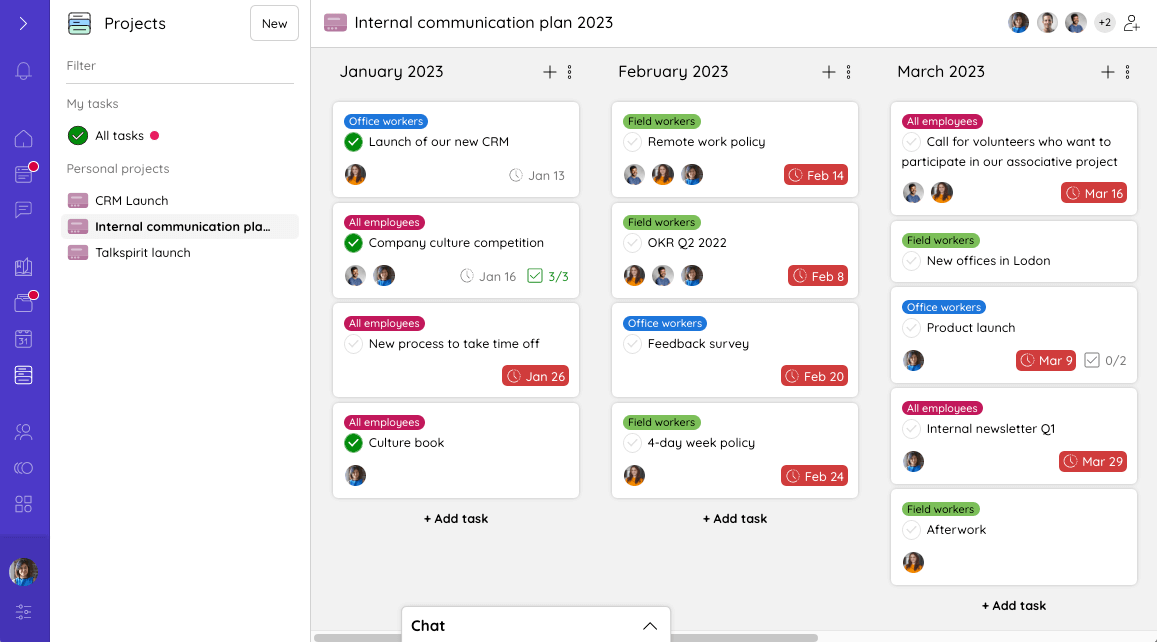
Listing and organizing your tasks will allow you to prioritize them better, thereby freeing your brain from the least important (or least urgent) information.
Many people think that doing several things at once makes us more productive. However, just the opposite is true! According to the American Psychological Association, multitasking can waste up to 40% of our work time.
Dealing with one task at a time, based on your predefined order of priority, reduces information overload and helps you gain productivity!
7. Try a digital detox
To fight against infobesity and FOMO (fear of missing out), some people try the digital detox: a method that consists in banishing all digital tools and/or objects from their daily life for a certain period of time.
Applied to the professional world, digital detox can thus promote the right to disconnect, and reduce the information overload coming from our digital tools. The goal is not necessarily to become a Neo-Luddite in total disconnection (zero technology), but rather to leave time slots where we disconnect from our work tools in order to work on tasks that require more concentration.
Try it out: switch your phone and notifications to “mute” mode. Activate the “do not disturb” mode for one or more hours. Let us know how that works for you!
| What you notice | What produces it | The practice that answers it |
|---|---|---|
| What you noticeYou open several tools to find one piece of information | What produces itApplications with overlapping scopes | The practice that answers it1. Streamline applications |
| What you noticeThe inbox has become the internal discussion room | What produces itEmail used as a conversation channel | The practice that answers it2. Limit internal email |
| What you noticeThe day is cut into pieces by meetings | What produces itToo many meetings, and they overrun | The practice that answers it3. Keep meetings to a minimum |
| What you noticeWork is interrupted every few minutes | What produces itNotifications left on by default in every tool | The practice that answers it4. Turn off notifications |
| What you noticeThe news feed mixes everything together | What produces itOne shared space instead of thematic groups | The practice that answers it5. Filtering the information flow |
| What you noticeYou no longer know where to start | What produces itTasks left unprioritised and handled in parallel | The practice that answers it6. Organize and prioritize your tasks |
| What you noticeTools get checked outside working hours | What produces itNo agreed slot for disconnecting | The practice that answers it7. Try a digital detox |
To conclude
Reducing the information overload linked to our digital tools implies acting on several fronts by involving all your organization’s stakeholders.
On the IT side, it’s important to put the right tools in place and ensure that their functional scope overlaps as little as possible.
Internal communication and managers, on the other hand, need to implement and share best practices to facilitate the flow of information, limit unnecessary internal emails and meetings, and promote the right to disconnect. Lastly, employees can reduce their own information overload by setting up their notifications, organizing the information on their work tools, and prioritizing tasks.
Before implementing any of these actions, you should of course start by establishing whether you, and your employees, are suffering from information overload, and if so, to what extent. Contact our team to get your personalized audit:
Contact an expert
¹ OpenText study (2022)
² Barco and Circle Research study (2019)
FAQ
80% of employees worldwide experience information overload, a surplus of information that they are not able to process. The cause is the constant drizzle of data coming from our digital tools, which over time reduces productivity and concentration and raises stress. It is also called infobesity.
More than a quarter of employees have to go through at least 11 applications to get the information they need to work. Which is a lot, especially since companies often run several tools with similar functions for video calls, chat or document storage.
According to Forbes, an office worker spends about 2.5 hours a day reading and answering emails. Much of that could be cut by moving internal exchanges off email onto an enterprise social network, intranet or digital workplace.
Half. On average, employees attend 10 meetings per week, half of which they deem unnecessary, and those meetings tend to overflow. Cutting both their number and their length is what reduces the overload linked to meeting fatigue.
By structuring where it lands. On an enterprise social network, create thematic and project groups so relevant information goes to a specific place rather than piling up in one general group, and invite only the people who need to be there or want to be there.
A method that consists in banishing all digital tools and objects from daily life for a certain period of time. Applied to work, it supports the right to disconnect. The goal is not total disconnection, but rather to leave time slots where we disconnect.



.webp)