
7 Ways to Make Your Remote Meetings More Effective

.svg)
An Asana study found that employees lose around three hours of work per week to unnecessary meetings. The culprit? A tendency to hold meetings that run too long or simply don't need to happen. This meeting overload has intensified alongside the rise of remote work and the proliferation of video calls — to the point where we now speak of "Zoom fatigue" to describe the exhaustion caused by back-to-back online meetings.
Beyond the fatigue, excessive video calls are a genuine drag on productivity. So how do you improve the effectiveness of your remote meetings? And what best practices can you adopt to reduce both the number and duration of your video calls?
Here are 7 tips to put meeting overload behind you 👇
1. Choose the right collaborative tool
First things first: it's important to equip yourself with the right tool.
- Do you only need a video conferencing tool or a platform that combines multiple collaborative features (such as Talkspirit, for instance?)
- Are you looking for standard or advanced features (for example, a tool that lets you run polls, brainstorm on a whiteboard, etc.)?
These are the questions you'll need to answer before choosing the right tool.
100% made in France, the collaborative platform Talkspirit lets you run video conferences and webinars, with built-in chat, polls, whiteboard, and breakout rooms. The platform goes even further with instant messaging, a news feed, a project management module, an office suite, a drive, a calendar, a knowledge library, and much more!
Why use one platform instead of several tools? Simply to streamline the employee experience, and avoid the confusion of overlapping tools. It's not uncommon to see organisations simultaneously using Zoom, Teams, and Talkspirit!
Also read: IT managers: how to rationalise your application portfolio?
Need more guidance? Download our methodology sheet to discover the 8 key steps to choosing the right collaborative tool and browse our ranking of the best collaborative tools to find the solution that fits your needs.
2. Set clear ground rules
If you want to improve the effectiveness of your remote meetings, it's equally important to establish clear ground rules. Here are some examples to inspire you:
- Ask participants to arrive on time, turn their cameras on (when bandwidth allows), and stay focused throughout.
- Shorten the duration of your remote meetings (according to HelloWork, the optimal meeting length is 37.5 minutes) and stick to the scheduled time.
- Limit the number of participants: only invite those directly involved, and encourage everyone to decline invitations to meetings that don't concern them.
- Allocate speaking time to each participant and ask them to keep to it.
- Remind participants not to interrupt each other, and to mute their microphone when they're not speaking (especially in large video calls).
Once these rules are in place, make sure to communicate them across every team. You could for example create a best-practices guide, or even a light-hearted video if you prefer a more creative approach, and share it as a post on your enterprise social network.
3. Clarify the meeting objective
Before inviting your colleagues to a meeting, think about what the meeting is actually for. For example, is its purpose to:
- make a decision,
- generate new ideas,
- give employees a chance to speak and/or answer their questions,
- share information,
- train and/or raise awareness among employees,
- highlight project progress,
- etc.
Clarifying your objectives upfront will help you improve the effectiveness of your remote meetings — and, above all, decide whether a meeting is actually necessary.
A useful test? Ask yourself whether the meeting could be replaced by a post or a message on your internal social network (or even an email if you don't yet have such a tool). If the answer is yes, the meeting probably doesn't need to happen.
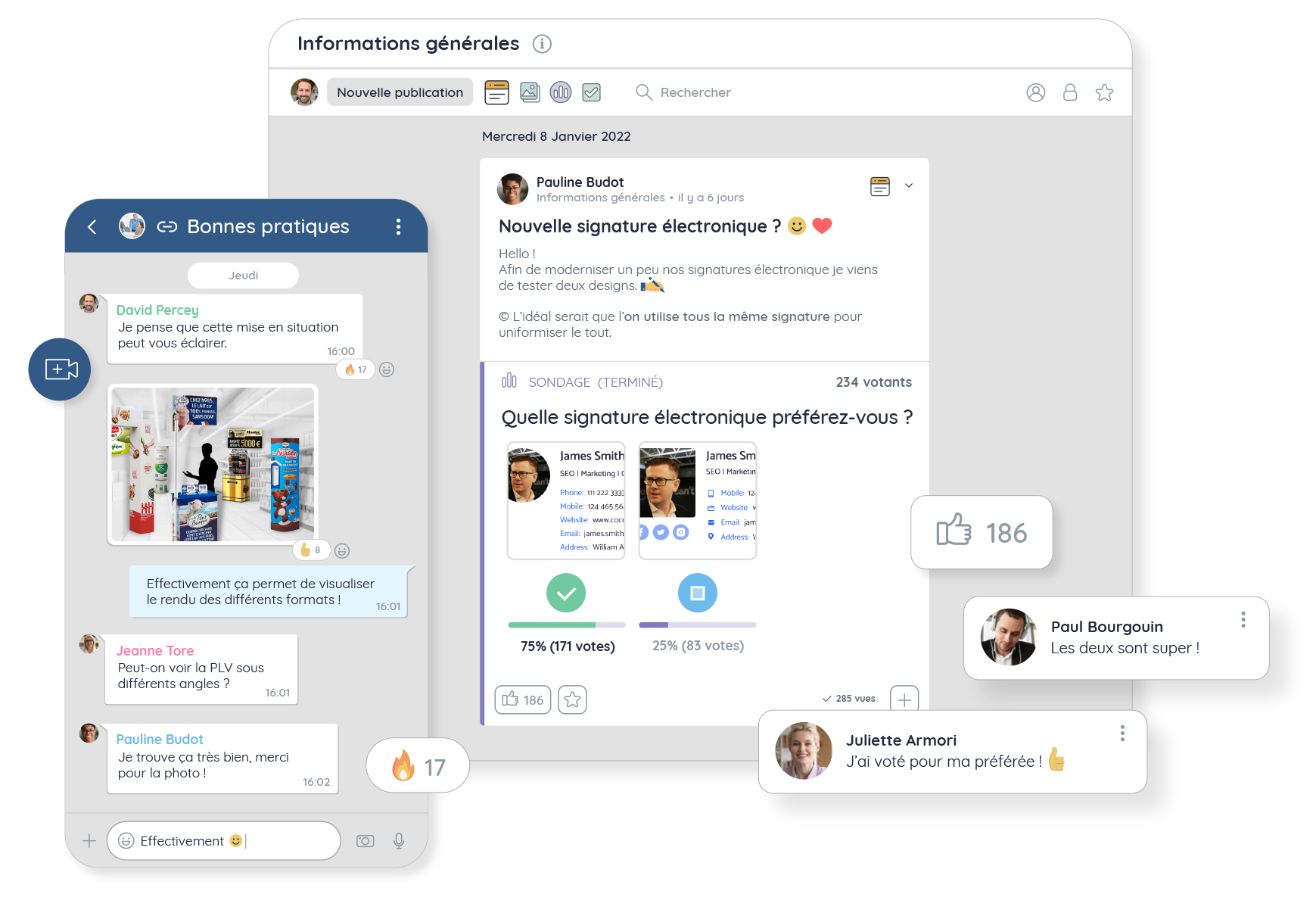
The news feed in Talkspirit is the ideal tool for sharing information with your teams and avoiding unnecessary meetings. You can use it to share news, images, documents, polls, task checklists, and more.
4. Prepare the meeting
Your objectives are clear and the meeting is genuinely necessary? Time to focus on preparing it. Here are the main things to keep in mind:
- Send an invitation to the relevant participants and include a video conferencing link.
- Create an agenda explaining what the meeting will cover and share it with participants in advance.
- Clarify each person's role before the meeting, and specify whether anyone needs to prepare anything (a presentation, an action plan, ideas for a project, etc.).
- Share any documents and/or visual materials participants may need before the meeting.
To keep everything in one place, we recommend creating a dedicated post on your intranet or collaborative platform where you can attach the agenda and any documents to review. Or simply add these elements directly to the meeting invitation.
5. Facilitate engagement during the meeting
The challenge with remote meetings is that people tend to disengage more easily. That's why it's essential to proactively facilitate the discussion. Here are a few ideas to keep your meetings lively:
- Restate the meeting objective at the start and share key information concisely.
- Do a quick round of introductions so everyone can introduce themselves (especially if participants are meeting for the first time).
- Propose an ice breaker to lighten the atmosphere and help participants get to know each other. You'll find some examples in this article.
- Give the floor to participants in turn and ask them to "raise their hand" when they want to speak (to avoid interrupting colleagues).
- Ask questions regularly and run polls to gather everyone's feedback.
- Use a visual aid (a presentation, a video, etc.) to support your points.
- Bring in some humour (if the atmosphere and company culture allow) to maintain attention and ease tension.
Finally, don't forget to clarify the next steps after the meeting, and keep an eye on the clock to avoid overruns. If the objective isn't reached, don't hesitate to schedule a follow-up (two short video calls are more effective than one long one).
6. Write up meeting notes
To improve the effectiveness of your remote meetings, we also recommend writing up minutes after each meeting — drafted by the facilitator or a designated participant.
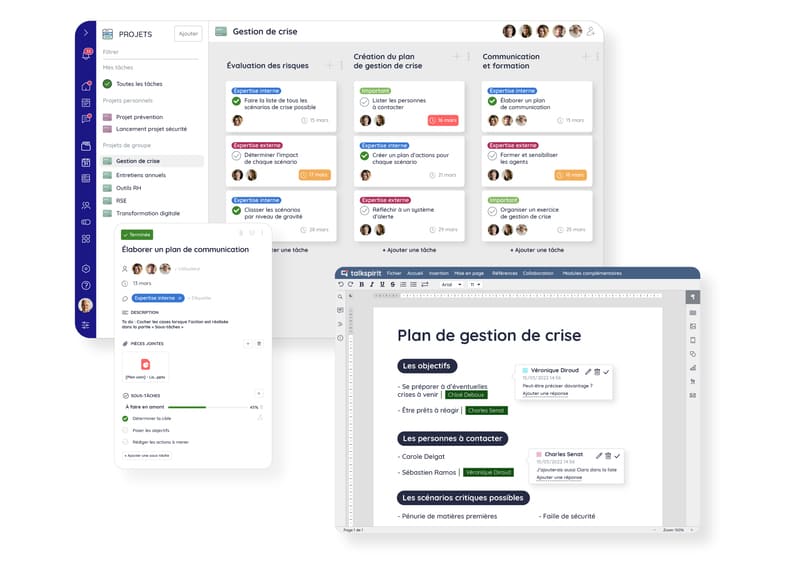
These notes will let you summarise the key points from the meeting, and outline the next steps to kick off once it wraps up. To make this easier, we recommend drafting your notes in a co-editable document (so anyone can update it if needed), which you can then share as a post. List all the tasks to be completed and assign them to the relevant team members directly in a project board.
Both of these features are available in the Talkspirit platform, as shown below.
7. Ask participants for feedback
Want to go further and keep improving your meetings? Ask for feedback from participants! It's the best way to identify areas for improvement and continuously evolve your practices. You have several options:
- do a round at the end of the meeting to let everyone share their immediate impressions,
- ask participants to complete a survey after the meeting,
- set up an ideas box where employees can suggest ways to improve the effectiveness of remote meetings.
Also read: Webinar recap: "Why and how to build a feedback culture?"
Here are some example questions to ask participants:
- Were you satisfied with the meeting overall? Why?
- Were you able to contribute and share what you wanted to?
- Do you feel the meeting objective was achieved? If not, what improvements could have helped?
- Did the meeting feel relevant? Was the duration appropriate?
Then take the time to regularly review this feedback and implement corrective measures. For example, if your team consistently feels that remote meetings run too long, you could consider capping video calls at 30 or 45 minutes.
*
* *
To wrap up
Improving the effectiveness of remote meetings requires genuine change management within the organisation. Once you've chosen the right collaborative tool, it's important to establish clear rules so everyone is on the same page — and to communicate and take a pedagogical approach so that these changes are actually adopted by your teams. Preparation, facilitation, and post-meeting follow-up all play a key role too, and should never be overlooked.
Looking for more best practices to improve the effectiveness of your remote meetings? Speak with one of our experts to get personalised advice.
And to keep all these tips at your fingertips, download our ultimate checklist for effective meetings 👇
Access the Checklist
In this checklist, you'll find: our best practices for running effective meetings, the 14 key actions to take before, during, and after every meeting, plus suggestions for further resources.



