
12 Alternatives to Internal Email for Better Productivity

.svg)
According to a Radicati Group study, the average employee receives 88 emails per day, a large portion of which are internal emails. With so many messages to process, staying focused and productive throughout the day isn’t always easy. Fortunately, there are now many alternatives — far more efficient and secure than internal email — for communicating and collaborating within a company, whether remote or on-site. Instant messaging, digital workplaces, video conferencing, enterprise social networks, collaboration suites… The options are endless!
In this article, we present 12 solutions to effectively replace internal email in your day-to-day work.
1) Instant Messaging: For Efficient Communication
Need to confirm your attendance at a meeting, ask for a document link, or congratulate a team member? Go for instant messaging. It lets you post your message or exchange messages quickly, in real time, in an informal way. Several tools (free and paid) are available, including: Slack, Signal, WhatsApp, Rocket.Chat, Google Chat, or Skype.
Read also: Collaboration: The “Trending” Apps and Features of 2020, According to Okta
Many collaborative platforms also include team messaging, alongside features like video conferencing or co-editing documents. If you’re looking for a more complete solution, jump to section 11 of this article.
2) Video Conferencing: To Speed Up Decision-Making
Want to consult your colleagues before making an important decision? Or maybe you need to discuss a sensitive topic with your manager?
Opt for video conferencing, with tools like Zoom, Jitsi Meet, Livestorm, or Whereby. It lets you connect live with your team, internal stakeholders, or people outside your company — no need to gather everyone in a meeting room, and no endless email threads.
3) Cloud Storage: To Store and Share Documents
Tracking down files shared by email can quickly become a headache, especially when multiple versions are circulating or the subject line and recipients have changed along the way.
Read also: 7 Reasons Why Email Is Already Obsolete
To avoid this information loss, opt for a file storage tool such as Google Drive, Dropbox, or Box. With cloud storage, you can quickly access all your work documents, and share them with colleagues, partners, and vendors — from anywhere, on any device.
If you want to consolidate your tools, consider a collaborative platform that includes both a secure drive, and other features like the office suite, team chat and video conferencing.
4) Online Office Suite: To Co-Edit Documents in Real Time
Whether it’s a best-of-breed tool (like Google Docs, Microsoft Office or OnlyOffice Docs) or built into an all-in-one collaborative platform, the online office suite is — by far! — the best alternative to internal email for co-editing documents with multiple people in real time.
No more swapping document versions by email. You can now work simultaneously on the same document, while keeping a full history of every change.
5) File Transfer: To Send Large Files
Have you ever tried sending HD videos or multiple photos by email? It can be quite a hassle! The best time-saving alternative is to use a file transfer tool (such as WeTransfer or Smash).
With a simple drag-and-drop, you can send and download large files easily and securely — no account needed on a third-party platform, and no need to send multiple emails in a row. Sometimes, a shared drive achieves the same result; it all depends on the storage space available.
6) Project Management: To Track and Organize Your Projects
You may be in the habit of sending a wrap-up email after every project meeting, listing each person’s tasks and deadlines. But that doesn’t stop you from having to follow up with everyone to ensure nothing slips through the cracks. The reason is simple: internal email is not an effective tool for managing projects (let alone complex ones).
Instead, turn to a project management tool (such as Trello, Asana, Teamwork, Basecamp, or Monday.com) that lets you plan and assign tasks, stay on top of progress, and get a full overview of all ongoing projects.
You can also automate certain processes, such as assigning a task, updating your calendar, or sending reminders.
7) Brainstorming Tools: To Gather Your Ideas
Need an online tool to capture, structure, and share your ideas with your team visually? Boost your brainstorming sessions — alone or as a group — with a virtual whiteboard (such as Stormboard, Klaxoon, or Miro) that lets you organize ideas as sticky notes and encourage everyone to contribute.
If you prefer brainstorming with mind maps, tools like MindMeister, Coggle, or Lucidchart are ideal for quickly connecting ideas and getting a big-picture view of any topic.
8) Surveys: To Collect Feedback and Drive Collective Intelligence
Whether you’re fine-tuning the agenda for your next meeting or assessing employee satisfaction, regularly collecting feedback is often essential. Internal email can work for one-on-one feedback, but things get complicated once multiple people are involved.
Read also: Webinar Recap: “Why and How to Build a Feedback Culture”
If you need to gather input from multiple people, a survey tool is your best bet. It lets you collect fast, quality feedback — and if you choose, anonymize responses to encourage more participation. Top options include SurveyMonkey, Typeform, GetFeedback, and Drag’n Survey.
9) The Intranet: For Internal Communication
The intranet is a central tool for internal communication. It helps you share company news, facilitate access to information and documents, and recognize employees’ contributions. Far more flexible than an internal newsletter, an intranet lets you distribute both “cold” and “hot” information in minutes, and drive engagement through features like comments and likes.
If this is what you need, consider an intranet like Talkspirit, Happeo, Lumapps, Jive, or Jostle.
Read also: Best Intranet Software Comparison
10) The Enterprise Social Network: To Share Best Practices
For several years now, enterprise social networks like Talkspirit, Workplace, or Yammer have become go-to hubs for fostering knowledge sharing and building collective intelligence across the organization.
Through a communities system, everyone can contribute, share tips and best practices, without cluttering inboxes. The result: employees are more willing to speak up, generating far more interaction than email ever could.

11) The Collaborative Platform: To Work as a Team
Looking for an alternative to internal email to collaborate on projects, synchronously and asynchronously, both internally and with external partners?
The collaborative platform enables you to:
- streamline information sharing
- simplify meeting organization,
- speed up communication,
- streamline collaborative work,
- and above all, cut down on internal emails!
With features like chat, drive, video conferencing, groups, task assignment, and integrations, you can avoid lengthy email back-and-forth and accelerate your teams’ work — wherever they are. Several platforms can help you unlock this collaborative potential, including Talkspirit, Microsoft Teams, Jamespot, or Jalios.
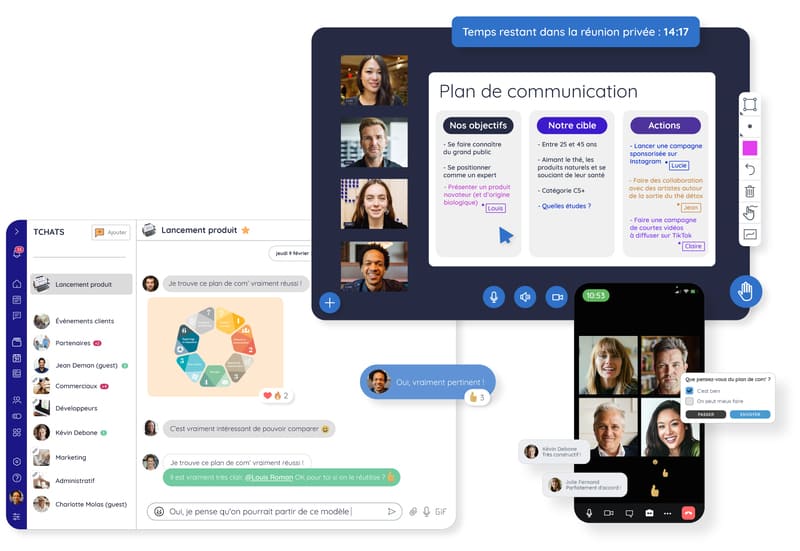
12) The Digital Workplace: To Connect All Your Applications
You’re probably thinking: 11 tools is already a lot to replace a simple inbox! And you’re right.
That’s precisely the purpose of the newest addition to the collaborative tools category: the digital workplace. This digital workspace brings together all the information, documents, applications, and people you need to work — wherever you are (working remotely, on the go, or in the office).
A digital workplace integrates all the tools mentioned above and lets you interact with all internal and external stakeholders.
In short: if you want to improve the work experience and productivity of your employees, now is the time to switch to a digital workplace solution ;). Discover our comparison of the 13 best digital workplace solutions.
*
* *
You now know 12 alternatives to internal email that can help you work more efficiently. Among all these tools, one stands out in particular: the digital workplace. So rather than deploying a dozen tools at once, keep it simple: implement a digital workplace that lets you communicate and collaborate on a single platform! We’ve compiled a practical guide with best practices for a successful rollout. Download it for our top tips!



