The 9 Essential Internal Communication Tools

.svg)
- Nine families of tools cover internal communication: intranet, enterprise social network, newsletter or internal magazine, digital signage, video conferencing, instant messaging, project management, digital suggestion box and all-in-one collaborative platform.
- The intranet centralizes reference content while the enterprise social network circulates live information: the two complement each other rather than replace each other.
- Newsletters, internal magazines and digital signage broadcast but do not invite participation. For engagement, you need a tool that accepts replies.
- A summary table brings the nine tools together with their main use, example solutions on the market and the limitation that usually decides the choice.
- The all-in-one collaborative platform covers the functions of most of the previous tools and removes constant switching between applications.
- Choosing the tool is one step, rolling it out is another: two dedicated articles take over at the end of the page.
Good internal communication starts with the right tools. Enterprise social networks, intranets, collaborative platforms… Organizations today have access to a wide variety of internal communication tools. With these tools, they can share information more effectively, promote their company culture, and foster exchanges across different teams.
But concretely, what do these tools do? What are their advantages and limitations? And how can they be used to improve internal communication?
Here is an overview of the 9 essential tools for internal communication.
 end HubSpot Call-to-Action Code
 1) The intranet
Primarily used to access reference content, an intranet is an internal network that centralizes all of the organization’s useful resources (for example, work processes, HR documents, company presentations, and so on).
It is therefore one of the ideal internal communication tools for maintaining a single source of truth, serving as a reference for all employees, wherever they are. No more scattered information: with an intranet, all documents are centralized in one place. It is also possible to manage user access rights, giving each person access only to the information they need.
Read also: Top 14 Best Intranet Software Solutions
Increasingly, intranets are also evolving, incorporating more social and collaborative features (chat, calendar, polls, events, internal announcements, integrations with business apps, etc.). Talkspirit, for example, offers an all-in-one intranet that includes all of these features.
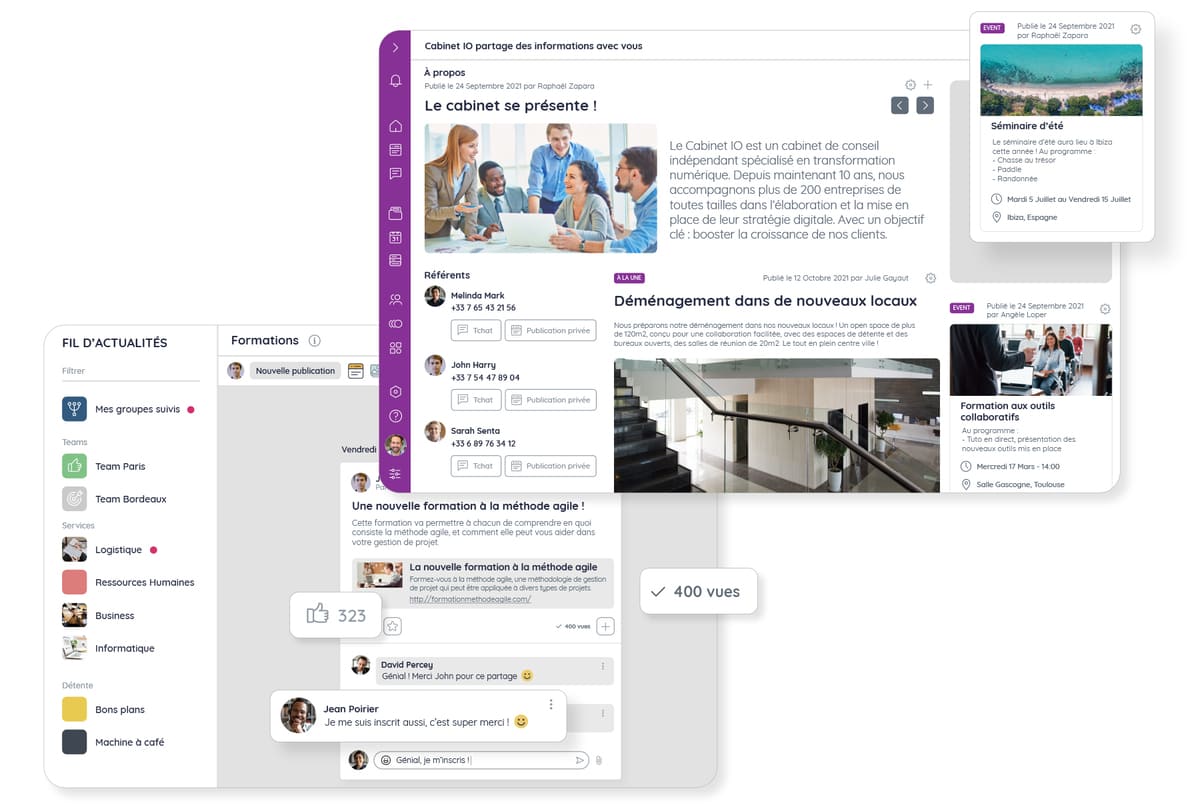
Create your intranet on Talkspirit
2) The enterprise social network
More comprehensive than the intranet, the enterprise social network (ESN) is an internal communication tool that makes exchanges more interactive. Used to share both static and live information, streamline exchanges, and strengthen team cohesion, the ESN is essential for modernizing your communication channels.
You can use it to:
- highlight your news and events on a homepage or news feed,
- recognize employees’ contributions by creating dedicated posts,
- encourage employees to engage by commenting on and liking their colleagues’ posts,
- boost cross-functional exchanges by creating cross-departmental groups.

Read also: Top 12 Best Enterprise Social Networks
3) The newsletter or internal magazine
The newsletter and the internal magazine are flagship internal communication tools. Distributed by email, in print, or even on your enterprise social network, they help keep employees informed about your news, and highlight the important projects of your organization.
You can include:
- photos showcasing your various projects,
- video interviews with your employees (if you’ve opted for a digital format),
- new content highlighting your products and/or services,
- stories about your company,
- and any information relevant to all employees.
As you can see: the newsletter and internal magazine are primarily used to push information downward. If you want to boost employee engagement and foster more dynamic exchanges within your team, you’ll want to choose another tool from this list.
Read also: Internal communication: the slow death of the internal newsletter
4) Digital signage
Are your employees frequently in the office? If you answered “yes”, digital signage could be very useful. More visual than a newsletter or internal magazine, it captures employees’ attention by broadcasting your messages on a large screen, an interactive kiosk, a touchscreen tablet, or even a digital totem.
Digital signage can be used to:
- broadcast videos introducing your company and team members,
- promote upcoming events and projects,
- introduce new employees joining the company,
- keep staff informed about market news.

5) The video conferencing tool
Do you frequently need to hold remote meetings? Opt for a video conferencing tool that lets you communicate with all your employees, whether they’re at the office, in the field, or working remotely. No more need to gather everyone in the same place to share important information.
With video conferencing, you can organize meetings to:
- inform employees about new processes and tools you plan to implement, and guide them through the rollout,
- gather employee feedback on your internal communication strategy,
- run workshops and/or brainstorming sessions with your team,
- share your monthly or quarterly KPIs (at company all-hands meetings).
However, be careful not to overdo it, to avoid creating “Zoom fatigue” among your employees.
Read also: How to Improve the Effectiveness of Your Remote Meetings?
6) Instant messaging
Instant messaging is a great way to reduce the length and number of your meetings. Like video conferencing, it lets you communicate in real time with your employees, but solely through written messages.
For example, internal communication teams can use chat to:
- recognize and/or thank highly engaged employees,
- send reminders about upcoming events,
- have 1:1 conversations with employees,
- welcome new team members,
- etc.
These messages can be read both synchronously and asynchronously. Each person can catch up on shared information at their own pace, without interrupting colleagues. Most instant messaging tools also let you customize your notifications to receive them only during working hours, or activate a “do not disturb” mode to focus on a specific task during a set time window.
7) The project management tool
Looking for a tool to organize and track project progress with ease? Choose a dedicated project management solution. Talkspirit, for example, offers a Projects module, which lets you create multiple kanban boards for personal and team projects, and see at a glance the tasks you have to do.
You can use Projects to:
- build your editorial calendar, and decide who is responsible for each communication,
- prepare the onboarding program for new hires,
- track your team’s OKRs (Objectives and Key Results),
- plan cross-functional projects with other teams, or with people outside your organization.
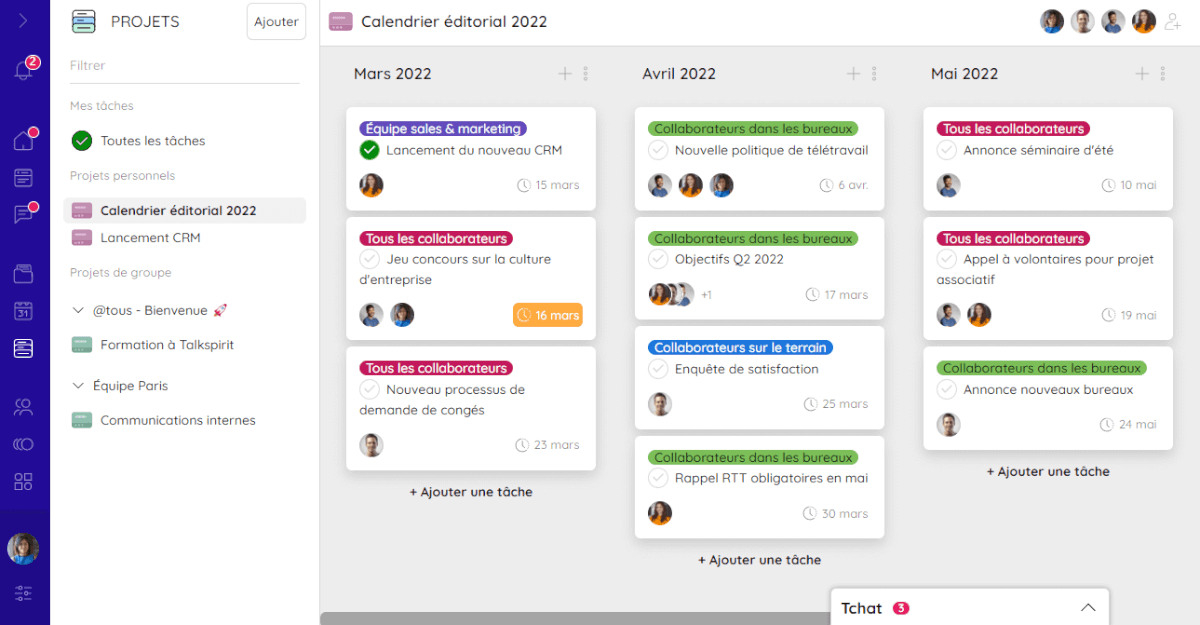
Editorial calendar in the Talkspirit Projects module
8) The digital suggestion box
The digital suggestion box is a great way to involve your employees in the life of the company, and show them that their input matters. With this tool, anyone can submit new ideas, anonymously or not, to improve working methods, strengthen team cohesion, or streamline existing processes. It is therefore an essential tool for boosting employee engagement!
For example, you can use the digital suggestion box to:
- gather employees’ needs on a specific topic (for example, what do they need to work from home effectively?)
- consult them before making an important decision (for example, are they open to moving to new offices?),
- and involve them in company projects that require a strong dose of creativity.
9) The all-in-one collaborative platform
Looking to minimize the number of internal communication tools you use, without compromising on functionality? A collaborative platform is the answer. A genuine all-in-one solution, it integrates the communication and collaboration features offered by most of the tools listed above.
Read also: How to Choose Your Collaborative Platform?
For example, the Talkspirit platform includes:
- a welcome portal and a news feed, to share your updates and important information,
- groups, to streamline exchanges within your communities,
- polls, to gather employee feedback,
- chat and video conferencing, to communicate in real time
- a drive and an office suite, to store, share, and co-edit documents,
- project management, to plan projects and assign tasks to your team members,
- a shared calendar, to check colleagues’ availability and invite them to meetings.
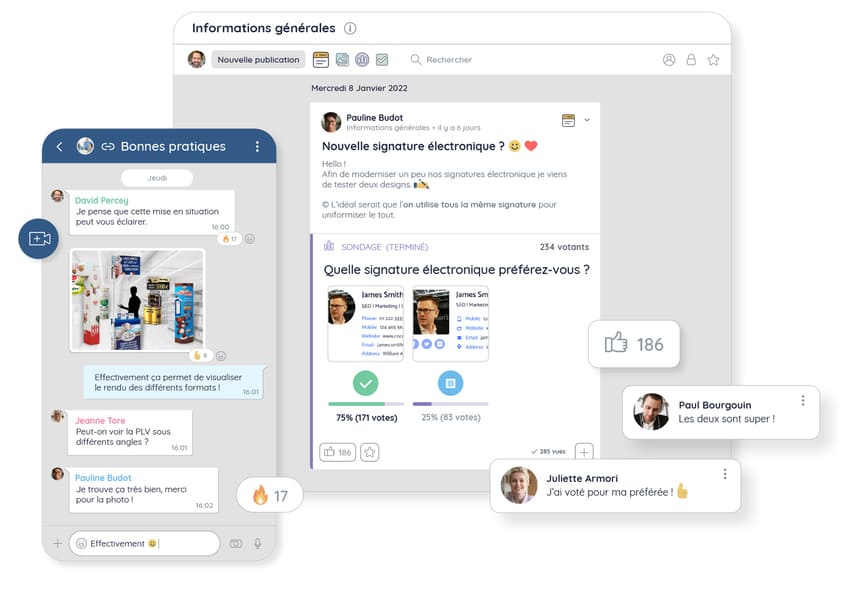
Chat and news feed on Talkspirit
There are many collaborative platforms on the market, but not all of them are necessarily right for your organization. Take the time to assess your needs and schedule a demo of each tool before making your choice.
Which tool for which use: the summary table
None of these tools covers every use. The table below brings the nine together, with what each one is actually for, examples of solutions on the market, and the limitation that usually decides the choice.
| Tool | Main use | Example tools | Limitation to keep in mind |
|---|---|---|---|
| ToolIntranet | Main useCentralize reference content and company documents | Example toolsTalkspirit, Jamespot | Limitation to keep in mindLittle interaction when social features are missing |
| ToolEnterprise social network | Main useCirculate live information and cross-team exchanges | Example toolsTalkspirit, Jamespot | Limitation to keep in mindNeeds regular facilitation to stay alive |
| ToolNewsletter or internal magazine | Main useSend edited information on a fixed schedule | Example toolsAn emailing tool, or your platform’s news feed | Limitation to keep in mindTop-down communication, with no feedback loop |
| ToolDigital signage | Main useReach on-site teams who have no computer | Example toolsCenareo, Steeple | Limitation to keep in mindShort, untargeted messages, with no archive |
| ToolVideo conferencing | Main useMeet remotely, in real time | Example toolsZoom, Google Meet | Limitation to keep in mindMeeting fatigue when overused |
| ToolInstant messaging | Main useTalk in real time, one-to-one or in groups | Example toolsSlack, Microsoft Teams | Limitation to keep in mindInformation gets lost fast, short memory |
| ToolProject management tool | Main useTrack project progress and the editorial calendar | Example toolsAsana, or the Talkspirit Projects module | Limitation to keep in mindNot built to broadcast news |
| ToolDigital suggestion box | Main useCollect employees’ ideas and feedback | Example toolsThe polls and forms in your platform | Limitation to keep in mindDies out if ideas go unanswered |
| ToolAll-in-one collaborative platform | Main useBring the functions above together in one place | Example toolsTalkspirit | Limitation to keep in mindA real rollout project to run |
Selection criteria are covered in How to Choose Your Internal Communication Tool, and what comes next, the rollout itself, in How to Successfully Deploy an Internal Communication Tool.
*
* *
Conclusion
You now know all the essential tools for improving your internal communication. Each of these tools can be used on its own, or in combination with others. If you implement a collaborative platform, you also have the option of relying on just one solution, and thus avoiding constant context-switching between applications.
To help you choose the solution(s) that fit you best, we’ve created a methodology guide with “8 key tips for choosing your internal communication tool”. Click the button below to access it for free:
Access the Methodology Guide
In this methodology guide, you’ll find: the 8 steps to choose a collaborative tool, the key elements to properly identify your needs, and the deciding criteria to compare the best solutions on the market.
–
Author: Emmanuelle Abensur
FAQ
The nine essential tools are the intranet, the enterprise social network, the newsletter or internal magazine, digital signage, video conferencing, instant messaging, the project management tool, the digital suggestion box and the all-in-one collaborative platform. Each can be used on its own or alongside the others.
An intranet centralizes an organization’s reference content in one place: work processes, HR documents, company presentations. It acts as a single source of truth for every employee, and access rights can be managed so each person only sees what they need.
The intranet is built for reference content that is consulted, while the enterprise social network is built for live information and conversation: posts, comments, reactions and cross-departmental groups. Modern platforms combine both.
They are mainly used to push information downward. To boost employee engagement and create genuine exchanges within the team, you need another tool from the list, one that lets employees answer back.
Digital signage is useful when employees work on site without a computer: shop floor, retail, logistics, healthcare. Messages are broadcast on a screen, an interactive kiosk or a tablet, which captures attention but leaves no archive to consult later.
An all-in-one collaborative platform such as Talkspirit brings together a welcome portal and a news feed, groups, polls, chat and video conferencing, a drive and an office suite, project management and a shared calendar. It replaces most of the tools listed above.