
10 Digital Tools to Improve Your Employees' Productivity

.svg)
According to an Asana study, employees lose around three hours of work per week due to unnecessary meetings. Add to this the time spent checking emails and notifications, constantly juggling between different tools, and sometimes even performing tasks twice. As a result, they spend more time "working around work" than performing high-value tasks, and their performance declines.
Fortunately, there are now many productivity tools capable of addressing this issue. When used wisely, they help streamline exchanges and collaboration within your teams. They also facilitate project management and tracking, develop collective intelligence, and of course improve employee efficiency.
Interested in this type of software? Here is a selection of 10 digital tools to improve your teams' productivity.
1. The all-in-one collaborative platform
The collaborative platform is the ideal solution for gaining productivity while rationalizing your work tools. A true all-in-one workspace, it brings together numerous features to help you communicate and collaborate better every day, including:
- an instant messaging tool,
- a video conferencing application,
- a project management module,
- a drive for storing and sharing your work documents,
- a shared calendar for scheduling meetings with ease,
- an online office suite for collaborating on documents in real time,
- a knowledge base to align employees on key company processes,
- etc.
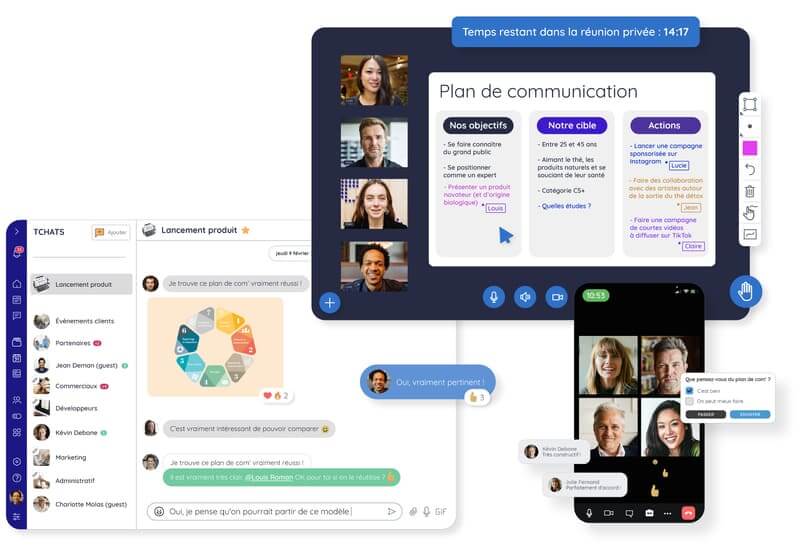
In addition to integrating all these features (and much more!), the collaborative platform Talkspirit offers you many guarantees in terms of data security. 100% hosted in France, the solution regularly conducts security audits to test the robustness of its network and verify that its security practices are rigorous. The icing on the cake: it is very easy to use and set up!
Want to discover more all-in-one tools? Explore our top 13 best collaborative platforms.
2. The project management solution
Improving productivity also means being able to manage projects efficiently. Our advice: use a project management solution! Asana, Trello, Notion, monday.com, Jira, Todoist, Teamwork, Wrike… There's no shortage of tools! These will help you:
- plan and visualize the different stages of a project (for example, via kanban boards),
- create checklists,
- assign tasks to team members,
- track the progress of those tasks,
- keep a record of all exchanges and documents related to your project.
Read also: Top 12 best software to improve productivity
And if you're looking for a French-made tool, why not opt for Talkspirit? In addition to integrating many collaborative features, Talkspirit offers an easy-to-use Projects module that brings together all the essential features to organize and track your personal and team projects. Schedule a demo with our team to discover this feature in detail 👇
3. The intranet
It's often overlooked, but the intranet is also a great tool for boosting your teams' productivity. Why? Simply because it allows you to facilitate information sharing and access within the organization, thus saving everyone time, both for daily tasks and for making important decisions. With an intranet, you can say goodbye to information silos!
Its key features include:
- the news feed and home portal, for sharing news and events with all employees,
- the knowledge base (or library), for facilitating the sharing of reference information,
- groups (or communities), for streamlining communication between employees with the same roles and/or interests (and encouraging cross-functional exchanges!),
- the directory and profile pages, for quickly finding out who does what in the organization.
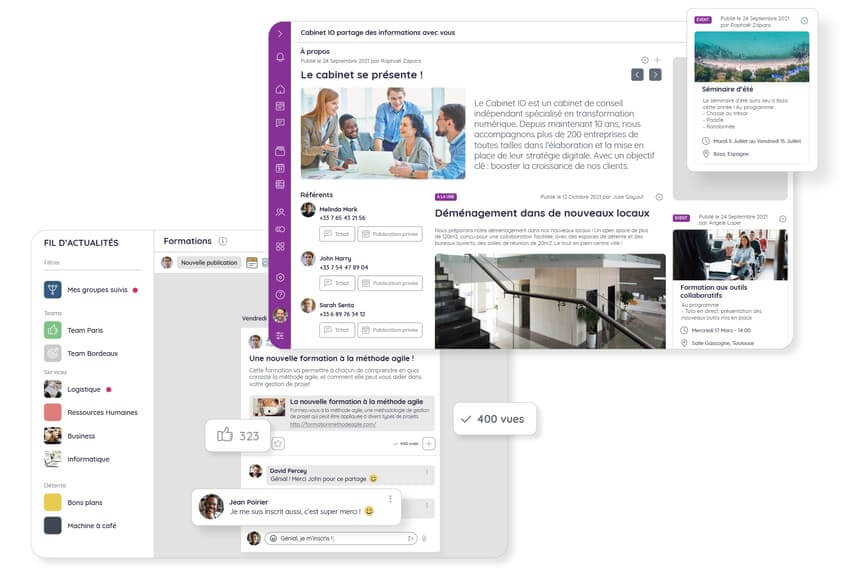
Looking to set up an intranet? Find our top 14 best intranet solutions on this page for better information flow and improved employee productivity.
4. The automation tool
Of course, we can't talk about productivity without addressing automation software, tools that have become indispensable today for automating our daily tasks and workflows. You can use them to create alerts, save data, send automated emails, add contacts to a list, etc.
In this space, notable mentions include:
- Zapier: the go-to tool for creating workflows (also called "zaps") and connecting all your applications without needing to write any code
- Make (formerly Integromat): the no-code automation platform that is easy to use and ergonomic
Did you know? 🤔
Talkspirit lets you connect more than +1,000 applications to your platform, and automatically surface information of your choice on your news feed (for example, a mention on your social networks, the publication of a new article on your favorite blog, the creation of a document on your drive, a new ticket raised on your customer support software, etc.).
5. The video conferencing software
With the rise of remote work and hybrid work, remote meetings have become commonplace in business. If you haven't already, we strongly recommend implementing a video conferencing solution (or a collaborative platform that includes this feature). You'll be not only more flexible (no more checking who's in the office to schedule a meeting), but also more productive!
Be careful, however, to limit the number and duration of your remote meetings to avoid falling into the meeting overload trap , which can, on the contrary, hurt your productivity! Here are some best practices to avoid wasting everyone's time:
- Invite only those directly concerned
- Define in advance the agenda and objectives of the meeting to clarify what is expected of everyone before, during and after the meeting
- Start and finish your meetings on time (if needed, schedule follow-up sessions to dig deeper into certain topics)
Want to deploy (or replace) your video conferencing tool? Head here to discover our selection of the 10 best video conferencing solutions.
6. The time management tool
Have you heard of time management tools? As their name suggests, these software solutions aim to help you manage your working time and improve productivity, for example by calculating how much time you allocate to each project, helping you eliminate distractions, or organizing your tasks by priority.
Here are some time management tools that might interest you:
- Toggl: the software for managing your projects and resources, and tracking time spent on each task
- Freedom: the app that lets you fully focus on your work by blocking notifications on your devices (notably via extensions)
- Hubstaff: the tool for easily measuring productivity and tracking your teams' work in real time, wherever they are
- Clockify: the free time management software that lets you see at a glance how long each of your tasks takes, and identify areas for improvement
7. The mind mapping software
The mind map (or "mind mapping") is a tool that allows you to facilitate your brainstorming sessions by capturing all your ideas visually in diagram form. You can use them, for example, to develop an editorial calendar, create presentations, list the key tasks of a project, or get your employees thinking about a specific topic. A great way to boost everyone's creativity and productivity!
Among the main mind mapping tools, notable ones include:
- Coggle: the tool for getting started with mind maps gently (better suited for occasional use)
- MindMeister: the comprehensive tool for brainstorming and collaborating with your team
- MindNode: the native mind mapping app for Apple device users
- Lucidchart: the software for creating intelligent diagrams and driving innovation
8. The monitoring tool
Whatever your employees' jobs, they very likely need to keep an eye on industry news and/or draw inspiration from their peers. And to optimize your monitoring, there's no secret: you need the right equipment!
Here are some tools to help you monitor industry news and improve productivity:
- Talkwalker Alerts: the Google Alerts alternative that lets you create alerts on any topic and receive monitoring content of interest by email
- Talkspirit: the collaborative tool that lets you connect your favorite social network, website and blog RSS feeds to a personalized news feed. The advantage? You automatically receive all articles and publications of your choice, without cluttering your inbox
- Feedly: an RSS feed aggregator that lets you follow various content formats (blogs, newsletters, social networks, etc.)
- Flipboard: the tool that lets you monitor visually by creating your own content wall
9. The password manager
Who hasn't wasted time clicking "Forgot password" to log into a work application? With a password manager, no more spending hours searching for your passwords (or worse: having to reset them). This digital vault lets you store all your passwords in one place and share them easily with your employees. No more frustration — and above all, greater efficiency.
Among the best password managers, notable ones include:
- Bitwarden: the open-source tool for storing your personal and team passwords securely
- Dashlane: the French software for automatically saving your passwords and payment methods
- LastPass: the tool that stores and secures your sensitive data
- 1Password: the password manager for developers and large enterprises
10. The online office suite
What better than an online office suite to streamline document collaboration? If you spend your time creating presentations and writing documents with your team, we guarantee this productivity tool will be a game changer! By using an online office suite, you'll be able to store, share, and co-edit documents together in real time. In short, no more sending documents for approval by email!
If you only want to deploy this tool, you can opt for OnlyOffice, LibreOffice, Microsoft 365 or Google Workspace, which offer free and paid comprehensive office suites. And if you'd rather kill two birds with one stone, implement a collaborative platform with an integrated office suite instead (like Talkspirit!), which will allow you to both share and co-edit documents, and communicate and collaborate with your teams all in one place.
Request a demo of Talkspirit's OfficeNow suite
*
* *
In conclusion
If you want to improve your teams' productivity, the first thing to do is provide them with the right digital tools! This could be a collaborative platform, a project management solution, or an online office suite… it all depends on your needs. And that's without counting all the business-specific software that plays a key role in team productivity (for example, CRMs, customer support software, accounting tools, electronic signature solutions, etc.).
Once your employees are well-equipped, it's also important to give them a few pointers on how to make the best use of the tools at their disposal and boost their productivity at work.
🤔 But how? Download our practical guide "10 tips to increase your teams' productivity" to discover our best advice:
Access the Methodology Sheet
In our methodology sheet "10 tips to increase your teams' productivity", you'll discover: all our best practices to help employees save time, manage their time, prioritize important tasks and measure their performance.



