
Org Chart Templates and Visual Organization Representation
.svg)
- An org chart is the visual representation of a company's structure: who works with whom, who is responsible for what, and whether the hierarchy is top-down or more fluid.
- Its real value is day to day: a reference point for new joiners, a way to see how the organization is evolving, and a way to spot friction.
- Word or PowerPoint are enough for a high-level view of the hierarchy; the moment you want to link the chart to roles and accountabilities, you need a dedicated tool.
- Four templates are covered here, each with its pros and cons: the holarchy (holacracy and sociocracy), the project-based structure, the product-based structure and the geographic one.
- None of them is good in the abstract: the summary table sets out the situation each one fits, and the trade-off that comes with it.
- The chart on its own is not the point: what produces transparency is the organizational model behind it.
A company org chart is a visual representation of your company structure.
It is a diagram that, if done well, answers the following questions:
- how are teams, projects, and people related to each other?
- who is responsible for what?
- is there a clear top-down hierarchy or is it more fluid than that?
A good organizational chart helps everyone in the organization because it adds clarity and transparency to the way we work together.
It is especially helpful for new employees who can refer to the organizational chart as they get familiar with your company.
It is also helpful to show how the organization is evolving and identify potential productivity pitfalls.

Do You Need an Organizational Chart Maker?
It depends on why you're designing a diagram in the first place.
You can easily draw up a simple org chart in Microsoft Word or Powerpoint but that's mostly a futile exercise.
If you just want a high-level view of the hierarchical structure in your organization, MS Word or Powerpoint might do the trick.
However, if you want a deeper understanding of how people work together within your organization, you'll need to use a more advanced org chart maker.
In Talkspirit, you can link your visual org chart with role descriptions and accountabilities to increase employee engagement, but more on that later.
Let's look at 4 common organizational charts first.
(We'll skip the traditional pyramidal hierarchy chart with layers upon layers of middle management because Talkspirit's purpose is to unleash the full potential of organizations. We don't support the status quo).
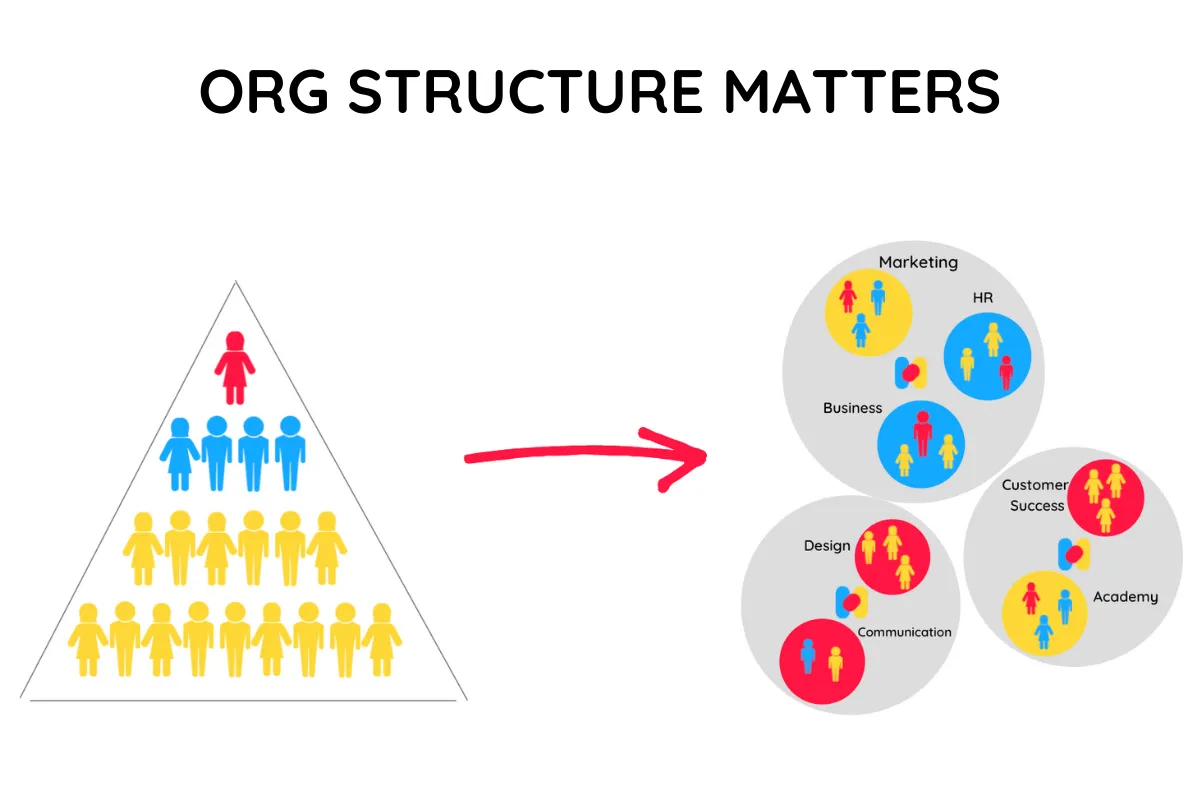
That is not a question of style. In a pyramid with several layers of middle management, the chart describes reporting lines more than it describes how the work actually gets done. The four templates below start from the opposite end. Two related reads if the subject interests you: how a flat organization actually works and how scaleups align their structure with their strategy.
There are many different ways of structuring a company and designing a horizontal org chart.
Here are 4 options that you can set up in Talkspirit in just a few minutes.
Org Chart Template #1: the holarchy
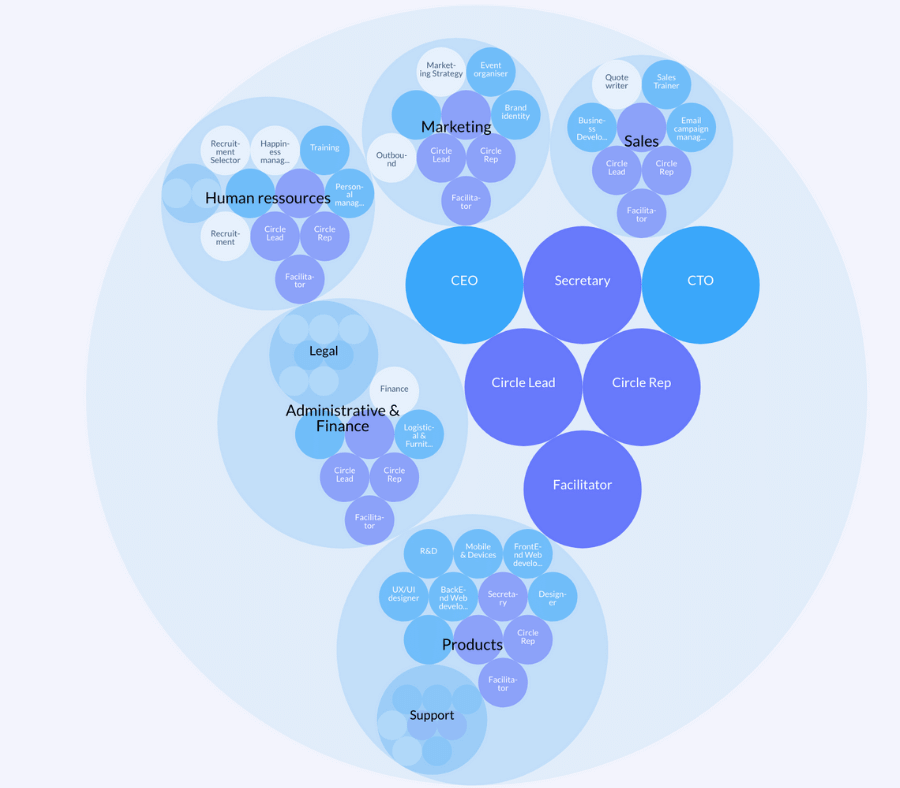
In organizations that practice Holacracy, Sociocracy, or Sociocracy 3.0, the organizational chart is mapped out as a holarchy with Circles and Roles.
Instead of hiring a person to do a job outlined in a single job description, people opt to take on one or more roles at any given time.
If they have skills or insights that could prove beneficial to the organization, they have the flexibility to move between Roles and teams (Holacracy and Sociocracy calls them "Circles").
The organizational structure of companies practicing Holacracy and Sociocracy is rather flat. There is little hierarchy in the sense that there are few or no levels of middle management between executives and staff.
The chart below represents a holacratic functional org chart:
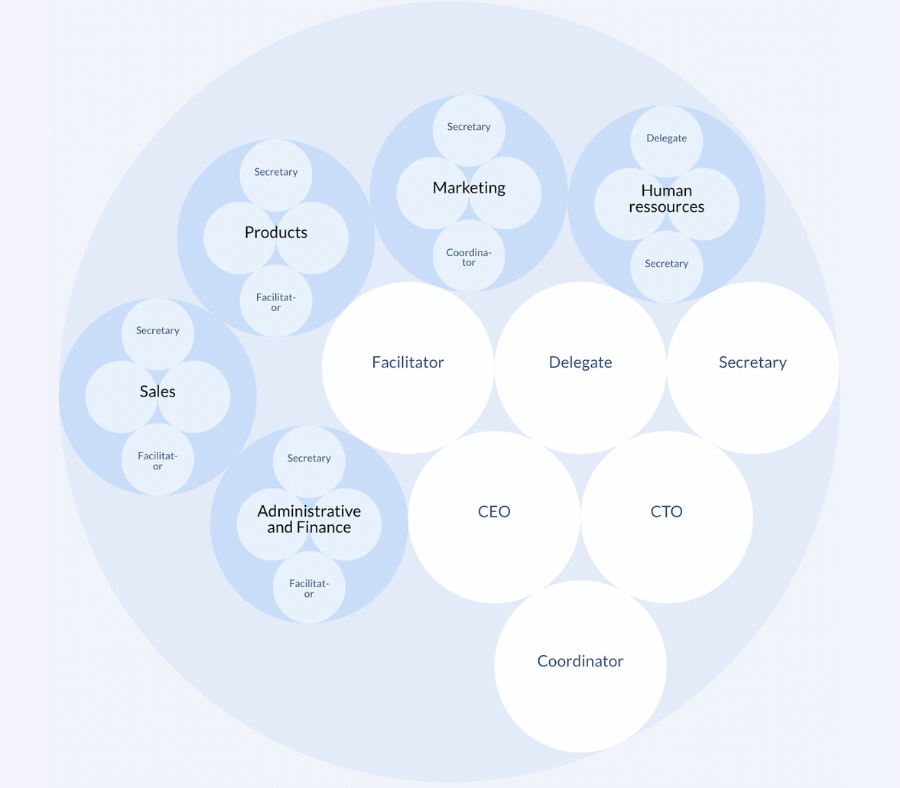
In a similar vein with slightly different dynamics and core roles, here's a sociocratic chart template:
Pros of the holarchy chart
- Gives employees more responsibility and the opportunity to work on what they do best
- Allow for distributed decision making
- Fosters more open communication
- Improves coordination and speed of implementing new ideas
Cons of the holarchy chart
- Can create confusion since employees do not have a clear supervisor to report to
- Can produce employees with more generalized skills and knowledge
- Can be difficult to maintain once the company grows beyond start-up status
Note: Small organizations under 10 people or a single team may have many roles but usually have only one Circle. If you have more, each "Circle" in your vision may actually be a "Role" within a single Circle.
Org Chart Template #2: the Project-Based Company Structure
Many businesses are naturally project-based, in the construction industry for example, but other companies can also organize their business structure based on projects.
Some companies find that this organizational structure leads to increased responsiveness, allowing them to adjust quickly to market changes.
Business environments that require constant and rapid innovation are especially suited to the project-based company structure.
They combine the flexibility of a matrix structure with the focus on single projects.
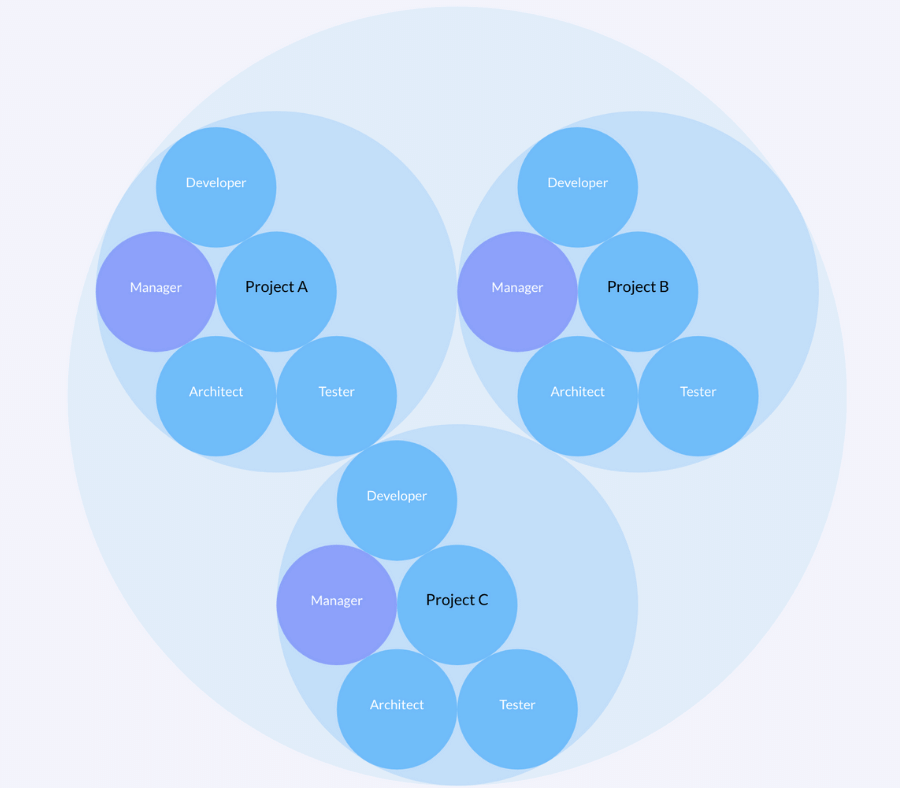
The organizational chart template below shows project teams that are independent from the parent structure, with their own technical staff and management.
Because projects are time-limited by definition, organizational structures based on projects continuously change as the projects change and can easily be updated on Talkspirit.
In the chart below, circles are separated by projects.
Pros of the project-based structure
- Teams can have a strong sense of identity. It is the easiest structure within which to create a strong team culture.
- The whole team is focused on the circle's goals, no conflict of loyalty exists with the day job for the people working on the project. Their day job is the project.
- Dedicated resources for each project. Work is done quickly and efficiently.
Cons of the project-based structure
- Having a team dedicated to one project is an expensive commitment. It tends to be an option only on big projects.
- It might be difficult to go back your previous role after working in a multidisciplinary environment on a new, challenging project.e. Managing the transition of the team when you close a project becomes even more important.
Org Chart Template #3: the Product-Based structure
In a product-based structure (also known as a divisional structure), you assign employees into self-contained circle according to:
- the particular line of products or services you produce,
- the customers you deal with.
This type of organization chart is mainly suitable for larger companies with two or more key product lines, strategic customers, or markets.
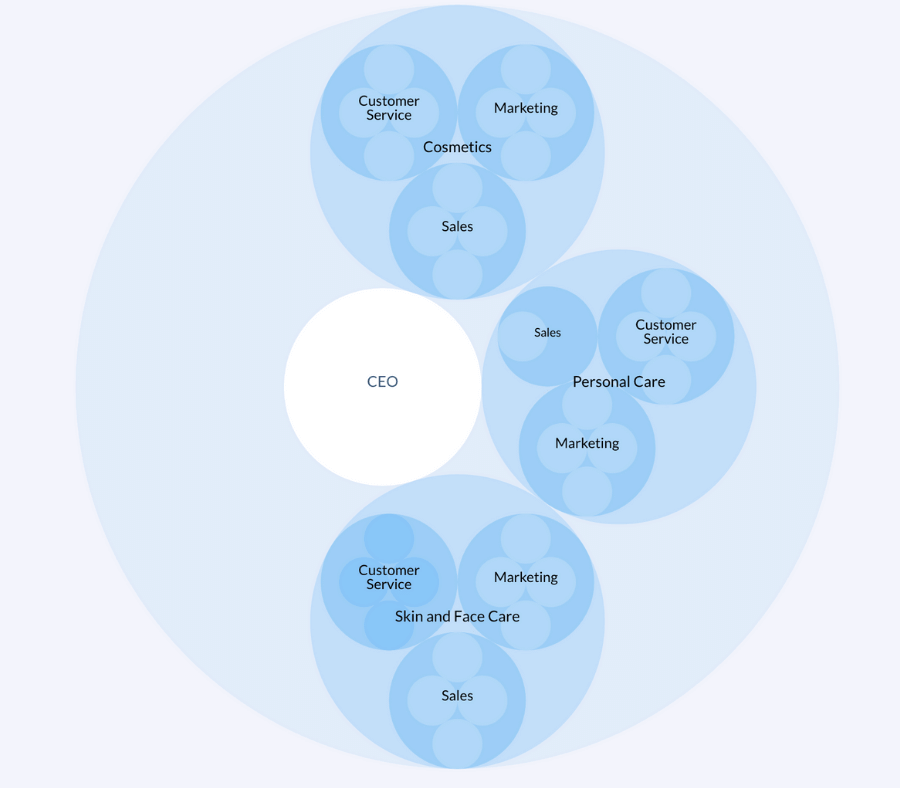
The product-based org chart may have several layers of teams. Each circle can have its own marketing team, its own sales team, and so on.
For example, in the diagram template below, you can see the organization structure of a company with a dedicated division for its cosmetics, a separate division for its personal care products and a third division for its skin care products.
Pros of the product-based template
- focus on specific market segments
- meet customer needs more effectively
- extend knowledge or expertise within specialized divisions
- respond to market changes more flexibly and quickly
Cons of the product-based template
- duplicating functions and resources, e.g. a different sales team for each division
- dispersing technical expertise across smaller units
Org Chart #4: the Geographic Divisional Org Chart
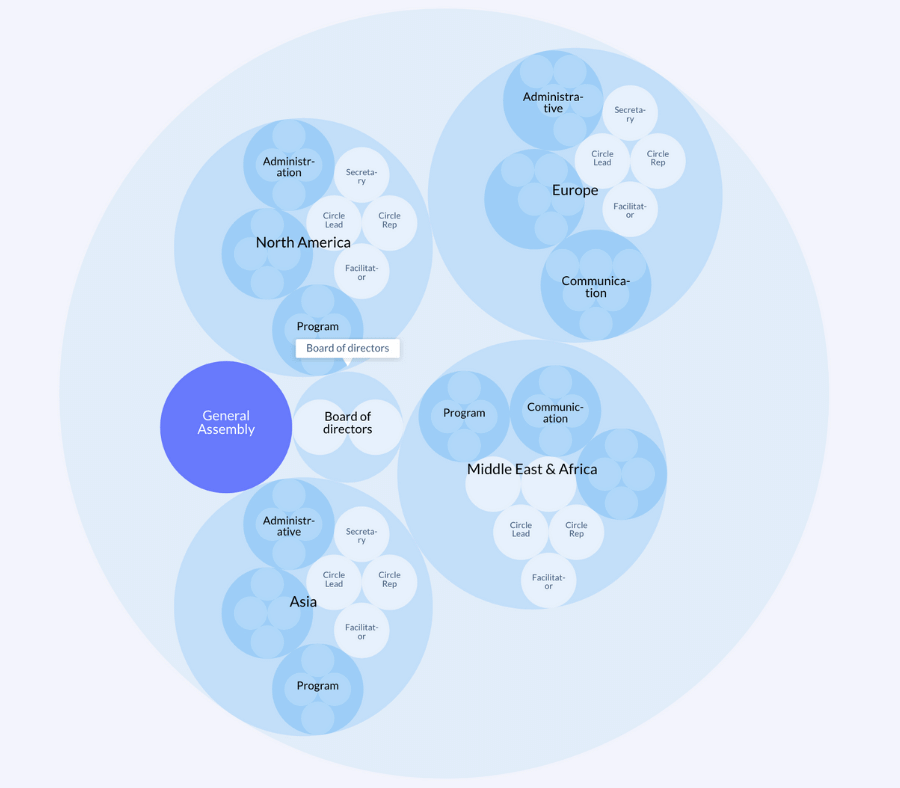
In this organizational chart example, circles are separated by regions.
This type of organization structure helps build more effective localization and logistics.
It is very common for international companies and NGOs.
Pros of the geographic chart template
- Helps large companies stay flexible
- Promotes independence, autonomy, and a customized approach per region
- Close communication with local customers
- Strong collaborative teams in each location
- The ability to better serve local needs and tailor their approach to the local market
Cons of the geographic chart template
- Potential duplication of roles and resources (although Talkspirit can help you avoid duplicates and manage cross-regional resources better)
- Insufficient communication between the headquarters and its divisions
Four templates, four situations. The table below puts them side by side: what each one assumes, and what it costs.
| Org chart template | Where it holds up | What to watch |
|---|---|---|
| Org chart templateHolarchy (holacracy, sociocracy) | Where it holds upFlat structure, little or no middle management, distributed decision making: people take on one or more roles rather than a single job. | What to watchWith no clearly identified supervisor, confusion sets in, and the model gets hard to maintain once the company grows beyond start-up status. |
| Org chart templateProject-based structure | Where it holds upEnvironments that require constant and rapid innovation, and project-driven industries such as construction. | What to watchA team dedicated to a single project is an expensive commitment: it tends to be an option only on big projects, and closing a project means managing the transition. |
| Org chart templateProduct-based (divisional) structure | Where it holds upLarger companies with two or more key product lines, strategic customers or markets. | What to watchFunctions get duplicated, a separate sales team per division for instance, and technical expertise is dispersed across smaller units. |
| Org chart templateGeographic divisional structure | Where it holds upInternational companies and NGOs, where logistics and fitting the local market come first. | What to watchRoles and resources are duplicated from one region to the next, and communication between headquarters and its divisions thins out. |
Next Steps
- pick an organizational chart template that seems like a good fit for now (don't worry, you can change later)
- open a 30-day free trial on Talkspirit (no credit card required)
- use our organization chart wizard to replicate the chart template in a few clicks
- play around with the tool in open mode, add circles and roles
- invite team members to add their own roles or give feedback so you can all make the organizational chart template your own as a team
Finally, don't hesitate to expand your horizons. Creating an org chart is great for visualizing who does what in the organization, however if you really want to bring transparency to your organization, you'll also need to implement an organizational model that provides the necessary framework for that. There are many different organizational models out there (such as Holacracy, Sociocracy, Teal, Agile, etc.), so go out and explore: you'll probably find something that will help your organization thrive! Want to know more about these models? Go check out our latest white paper 👇
Access White Paper
In our white paper "The Ultimate Guide to Organizational Models", you'll get: a comprehensive overview of innovative organizational models (like Agile, Teal, Holacracy, Constitutional Management, and more), testimonials from pioneer organizations that have successfully adopted it, best practices for choosing, implementing and measuring the effectiveness of our model, as well as digital tools to facilitate the transition.

FAQ
It answers three questions: how are teams, projects and people related to each other, who is responsible for what, and is there a clear top-down hierarchy or is it more fluid than that. Done well, it adds clarity and transparency, and it is especially helpful for new employees getting familiar with the company.
It depends why you're drawing it. You can easily draw up a simple org chart in Microsoft Word or PowerPoint, and for a high-level view of the hierarchy that may do the trick. If you want a deeper understanding of how people actually work together, you need a more advanced org chart maker that links the chart to role descriptions and accountabilities.
It is the org chart used by organizations practising holacracy, sociocracy or Sociocracy 3.0: the structure is mapped as circles and roles rather than boxes and lines. Instead of hiring a person for a job set out in a single description, people take on one or more roles at a time and can move between roles and circles.
Three, mainly: it can create confusion, since employees have no clear supervisor to report to; it tends to produce more generalized skills and knowledge; and it becomes hard to maintain once the company grows beyond start-up status.
In business environments that require constant and rapid innovation, and naturally in project-driven industries such as construction. Teams gain a strong sense of identity and dedicated resources, but a team dedicated to one project is an expensive commitment, so it tends to be worth it only on big projects.
Also known as a divisional structure: employees are assigned to self-contained circles according to the particular line of products or services you produce, or the customers you deal with. It mainly suits larger companies with two or more key product lines, strategic customers or markets.


%252520(1)%252520(1).webp)
.webp)