9 Best Practices for Setting Up an Enterprise Social Network

.svg)
- Nine best practices for setting up an enterprise social network, also called an internal social network.
- Six steps happen before launch: goals and audience, benchmark, barriers to adoption, ambassadors, platform preparation, communication plan.
- Three carry on afterwards: putting employees in the spotlight, change management, usage tracking.
- Group structure, privacy levels, administrators and usage rules are decided before the first invitation goes out.
- Compare platforms on features, support, onboarding services, storage and where the data is hosted, with hosting inside the European Union the safer choice.
- According to a Lecko study reported by Ouest-France, 58% of large companies have one.
The enterprise social network (ESN), also called an internal social network, remains an essential tool for improving internal communication and keeping teams connected. According to a Lecko study reported by Ouest-France, 58% of large companies have one. Setting up an enterprise social network is not something you improvise, though. It takes preparation, both upfront and throughout the rollout, to anticipate needs, communicate with employees, remove barriers and support change.
To give your project the best chance of success, we have put together 9 best practices for setting up your enterprise social network, from defining your goals to tracking usage.
1. Identify the goals and the audience of your ESN
To set up your enterprise social network, you first need to be clear about:
- what the tool is for (in other words, what its goals are),
- and who is going to use it (the whole organisation, or only part of it).
An enterprise social network can, for example, aim to:
- streamline internal communication and information sharing,
- strengthen cohesion and a sense of belonging,
- make cross-functional exchanges easier,
- develop knowledge sharing,
- or cut down the volume of internal emails.
Read also: 8 advantages of using an enterprise social network
This needs assessment has to involve both business units and senior management, so that the whole organisation is aligned. Once that is settled, you can draw up a requirements document covering the features you expect from your enterprise social network and the budget you can allocate to it.
2. Run a benchmark to find the right tool
Then comes the step everyone is waiting for: choosing your enterprise social network. What matters most, of course, is that it answers YOUR needs, and the criteria listed in your requirements document.
For each solution, make a point of comparing:
- the features available in each plan,
- the customisation options,
- how responsive customer support is,
- the onboarding and support services on offer,
- the storage space provided,
- how easy the tool is to roll out and to use,
- where the data is hosted (favour hosting inside the European Union to keep your data confidential).
Several enterprise social networks tick every box? Request a demo and try these tools with your team, so you set up the one that fits you best.
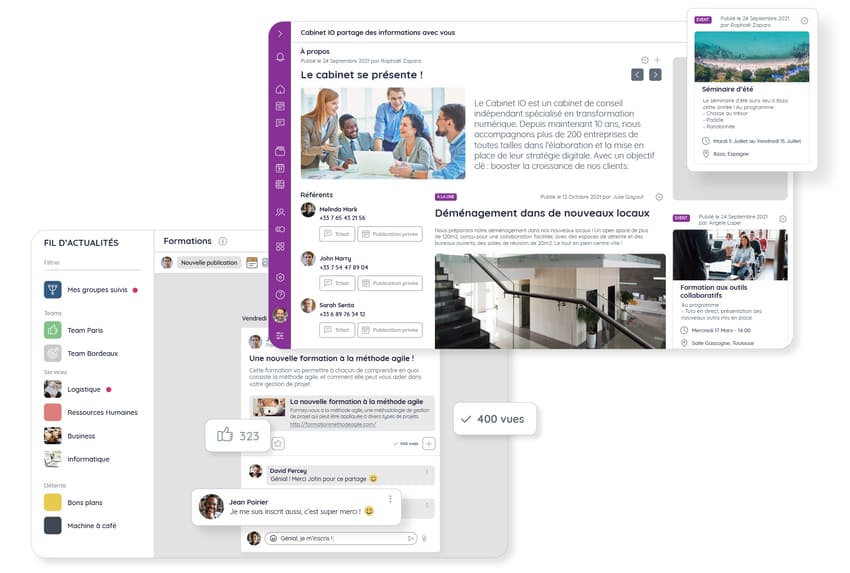
That is exactly what Talkspirit offers: a 100% French enterprise social network that makes information easy to share, through a welcome portal, a newsfeed, a chat, a library and a video conferencing module.
3. Anticipate the barriers to adoption
It is easy to forget, but a number of barriers can get in the way of adopting a new tool. To anticipate them properly, you need to identify them before you set up your enterprise social network. The most common ones are:
- lack of time (for administrators and users alike),
- lack of preparation and of day-to-day facilitation on the platform,
- tool overload (the enterprise social network is then seen as “one tool too many”),
- reluctance to switch tools (often summed up as “things were better before”),
- lack of communication from senior management,
- lack of involvement and initiative, from managers and community facilitators alike,
- the absence of governance and operating rules,
- a tool that does not match what users actually need.
To go further on this, we suggest reading:
👉 the 10 mistakes that can derail your enterprise social network rollout,
👉 and our advice on boosting the adoption of new collaborative tools.
4. Build a network of ambassadors
Building a network of ambassadors can give your rollout a real push. Messages from senior management matter, of course. But they are not always enough to get employees to log in and use the platform. Nothing works better than ambassadors to lead by example and drive adoption.
How do you spot an ambassador? 🧐
An ambassador is an enthusiastic user who is convinced that an enterprise social network is worth setting up, knows how to use this kind of tool, and wants to get involved in the project. Someone who communicates well, knows how to persuade and handle objections, and can train colleagues if needed.
A good way to find them is to gauge the mood before the rollout, and see who is keenest to test the platform and take part in the project.
5. Prepare the platform
Preparing your platform is a key step in setting up your enterprise social network, because this is when you decide:
- the structure of your groups (which types of groups you want to create, and how you will organise them),
- the privacy level of each group (open to everyone, or to a selected few?),
- who administers the enterprise social network, facilitates it and shares content in the groups and on the home page,
- the usage rules (in particular, who can post what, and where),
- where the enterprise social network sits among your existing tools (does it become the hub of internal communication, or does it complement other tools?).
All of this has to be settled before launch, so that you give users the best possible experience. The moment invitations land, employees find a platform that is ready to use, with predefined groups and content already in place. In short, a platform that makes people want to use it.
6. Build a targeted communication plan
Your ambassadors are identified, your platform is ready, the likely barriers are mapped. All that is left is to communicate. To organise your messages, we recommend building a targeted action plan that includes:
- the launch date of the enterprise social network and how you will announce it (an invitation email, an announcement at an event, a message from senior management, posters in the offices, and so on),
- the messages and the pitch to prepare for managers and ambassadors,
- the types of “engaging” content that group managers and facilitators can share (a video, a competition, a poll, and so on),
- the training dates,
- the goals you want to reach (both qualitative and quantitative).
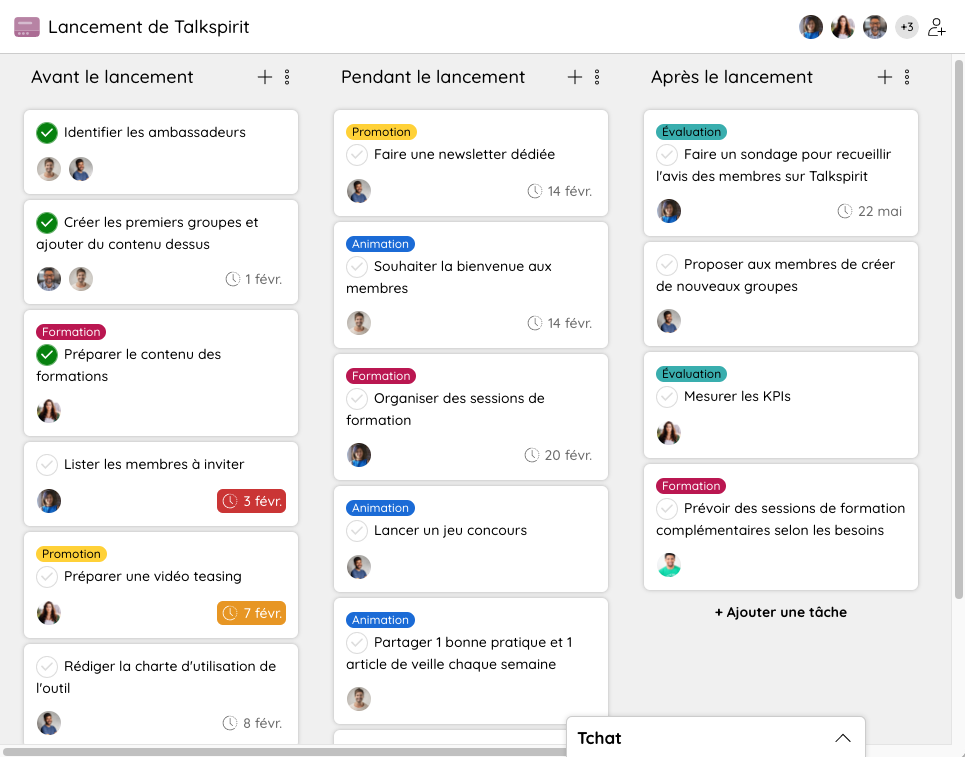
This communication plan can live in a spreadsheet, in a project management tool, or simply on your internal social network, if it has a feature for that. That is what you can do with the Talkspirit Projects module, which lets you create project boards, assign tasks and add deadlines.
7. Put employees in the spotlight
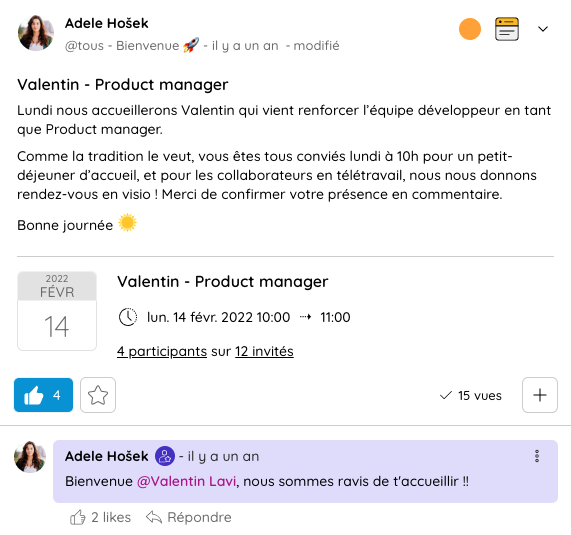
Another good practice when setting up an enterprise social network is to publish posts that highlight each team’s contributions and projects: a new contract signed, a new product or service launched, a new colleague joining, or an event that went particularly well.
In the early days on the platform, internal communications can usefully publish this kind of content to give recognition and rally employees around shared projects. Over time, the teams take over and communicate about their own work themselves.
8. Support change management
Whenever a new tool is introduced, you also need to support the change, in particular through training sessions. Beyond a walkthrough of the features, what really deserves attention is what the platform brings to people.
How will it help users in their daily work? What information will they find on it? And how will it help them stay connected with remote colleagues? Those are the questions to address if you want usage to grow.
If the rollout covers several sites or several business lines, the change management tools and methods will help you sequence the waves of users joining the platform.
Finally, spell out the rules of use, for instance by writing a usage charter.
9. Track usage continuously
Wondering what employees think of your enterprise social network? Run an internal survey to collect their feedback and understand what users like (and what they do not): login frequency, ease of use, types of groups used.
We also encourage you to track usage statistics regularly: number of registered users, share of active users, number of messages and posts shared, engagement rate on posts. Those figures read all the better next to the main internal communication KPIs.
Combined with more qualitative feedback, they give you a solid picture of how your enterprise social network is used, and of the initiatives to launch next.
Recap: who decides what, and when
The first six steps happen before the first employee receives an invitation. The last three start on launch day and never really stop. Here is the full sequence, worth keeping in front of you throughout the project.
| Step | What gets decided | When |
|---|---|---|
| Step1. Identify your goals and your audience | What gets decidedWhat the tool is for, who will use it, the requirements document and the budget | WhenBefore launch |
| Step2. Run a benchmark | What gets decidedThe platform you pick, after comparing features, support, onboarding services, storage and where the data is hosted | WhenBefore launch |
| Step3. Anticipate the barriers to adoption | What gets decidedThe barriers specific to your organisation, and the answer to each one | WhenBefore launch |
| Step4. Build a network of ambassadors | What gets decidedWho the ambassadors are and what is expected of them | WhenBefore launch |
| Step5. Prepare the platform | What gets decidedThe group structure, the privacy level of each group, the administrators, the usage rules and the place of the tool among your other systems | WhenBefore launch |
| Step6. Build a targeted communication plan | What gets decidedThe launch date, the channels, the pitch for managers and ambassadors, the content, the training dates and the goals | WhenBefore launch |
| Step7. Put employees in the spotlight | What gets decidedWhich contributions and projects to highlight, and who does it | WhenAt launch and in the first few weeks |
| Step8. Support change management | What gets decidedWhat the training sessions cover, and the usage charter | WhenAt launch, then on an ongoing basis |
| Step9. Track usage | What gets decidedWhich metrics you follow, and how often you run internal surveys | WhenAfter launch, on an ongoing basis |
*
* *
Setting up an enterprise social network holds no more mystery for you 😉. From identifying your needs to finding ambassadors, removing the barriers to change and building your communication plan, you now know the best practices to follow and how to see your project through.
Like many of our customers, you may want more concrete examples before taking action. We thought of that 😎. To help you get started, we have created 10 post examples to use on your enterprise social network. Click the button to access them for free 👇
Access the post templates
Discover 10 post examples for your enterprise social network, ready to publish as they are or to customise. You can use them, among other things, to welcome a new colleague, congratulate teams, share event highlights or collect user feedback.
FAQ
Nine steps. Six happen before launch: identify the goals and the audience, run a benchmark, anticipate the barriers to adoption, build a network of ambassadors, prepare the platform and build the communication plan. Three start on launch day and carry on: put employees in the spotlight, support change management and track usage.
By clarifying what the tool is for and who will use it. That needs assessment has to involve both business units and senior management, so the whole organisation is aligned, before you draw up a requirements document covering the expected features and the budget.
The features available in each plan, the customisation options, how responsive customer support is, the onboarding and support services, the storage space, how easy the tool is to roll out and use, and where the data is hosted. Hosting inside the European Union is the safer choice for data confidentiality.
Lack of time for administrators and users alike, lack of preparation or of day-to-day facilitation, tool overload, reluctance to switch tools, lack of communication from senior management, lack of involvement from managers and facilitators, the absence of governance and operating rules, and a tool that does not match what users need.
An enthusiastic user, convinced the tool is worth it, who knows how to use it and wants to get involved in the project. Someone who communicates well, knows how to persuade and handle objections, and can train colleagues if needed. You find them by gauging the mood before the rollout.
By combining an internal survey that collects user feedback with regular tracking of usage statistics: number of registered users, share of active users, number of messages and posts shared, and engagement rate on posts.