[Expert Advice] 6 Best Practices for Securing Your Workstations
.svg)
According to a Sophos study, 66% of organizations worldwide were hit by ransomware in 2023. Amplified by the spread of remote work and BYOD (bring your own device), these attacks consist of “holding a company's data hostage, then demanding a ransom to unlock access to it”, as explained on our blog by Laurent Hausermann, IoT Security Engineering Director at Cisco.
But those are not the only threats facing companies. Phishing, denial of service attacks (DDoS), insider threats: cyberattacks can take many forms.

In some cases, these attacks can prove fatal for the company. According to the National Cyber Security Alliance, 60% of small and medium-sized businesses that fall victim to a cyberattack go out of business within six months.
That is exactly what happened to the lingerie manufacturer Lise Charmel in February 2020. As this example shows, smaller companies are not safe from cyberattacks. To protect themselves, they need to invest “more and better” in IT security.
Which actions should come first? And what strategy should you put in place to protect yourself from potential cyberattacks? 10 experts share their best practices for securing workstations and all of the data of the organization:
[This article is an extract from our white paper “Hybrid Work: New Challenges for IT Leaders”. Click on the banner to access the full white paper for free 👇]

1. Put Basic IT Hygiene Rules in Place
For Laurent Hausermann, securing workstations starts with “putting the basic rules of IT hygiene in place”, for example:
- Back up your data regularly on two different media, for instance on a local hard drive and in the cloud, and check that it can be restored if something goes wrong. That is what Olivier Montanes, IT & Business Improvement Director at Decoufle, does:
“Backups are very important to guard against IT attacks. That is why we run a double backup of our information system. One version is stored on site, and the other on an external site.”
- Take out cyber insurance so that you are covered in the event of an attack and get support
- Define an update policy for the information system
- Implementing a password management policy requiring users to use strong passwords
- Installing antivirus software and a firewall on workstations
- Encrypt sensitive data, especially on mobile devices
- Run a security audit every year to assess how effective the measures in place are and apply fixes
2. Secure Remote Access
Once the basics are in place, the next step is securing the workstations of employees working remotely. Here are several approaches:
Set Up a VPN (virtual private network)
“Right from the start of the Covid crisis, we set up cross VPN access with remote control of the on-site workstations. That way employees find the same working environment wherever they are, without it being accessible to outsiders.” Alexandre Cicero, IT Manager at FizFab (a group specializing in the manufacture of medical and gym equipment)
Use a Two-Factor or Multi-Factor Authentication System
This lets you verify users' identity using at least two different factors (a PC, then a mobile application, for example).
Use a Network Monitoring Tool
With this kind of tool, you can easily monitor how devices are used on site and remotely.
Deploy an Identity and Access Management (IAM) Solution
“Before the Covid crisis, employees' rights to information were fairly broad. Given our growth and the increased mobility of our staff, we decided to deploy an IAM solution. That way we can manage user access in a more granular way, depending on their role.” Sebastien Louyot, IT Services Director at Doctolib
Deploy a Mobile Device Management (MDM) Solution
Adding an MDM solution to your IAM software makes it easier to manage and secure employees' mobile devices, and to wipe the data remotely if a device is lost or stolen
Adopt a Zero Trust Approach
This security model grants users only the access they need to do their job. Every user, device or application has to authenticate in order to reach company data, which keeps security gaps to a minimum.
According to Ping Identity's Executive Survey, 82% of French executives and managers have already implemented or trialed elements of the Zero Trust model in their company, and 70% believe these investments should continue in 2022.
It is also the security strategy chosen at Doctolib:
“This year we put in place a Zero Trust strategy, which lets us grant access to applications based on 3 criteria : the user, the device they connect from (personal or professional) and the place they connect from (at the office or remotely). Depending on those criteria, we can allow access or not, and give users different levels of rights. For instance, if I connect from a device that is not secure, I will have read-only access to a document. And if I connect from a Doctolib device, I can have administrator rights on that file.” Sebastien Louyot, IT Services Director at Doctolib
Read also: Hybrid Work: How to Secure Data Shared by Your Employees?

3. Segment the Network
Another way to secure workstations? Segment the network, in other words split your company's applications and infrastructure into several subnetworks. “The idea is to choose several modules and solutions, and install them on different systems or servers. It is a well-known rule: do not put all your eggs in one basket”, explains Winoc Coppens, CIO of the 20 Minutes group.
Network segmentation is particularly effective at containing cyberattacks, because it stops them from spreading to other parts of the information system. It also gives you better visibility over your network, and so makes threats easier to detect.
Another way to compartmentalize data remotely is to use a VDI infrastructure (virtual desktop infrastructure), that is, a virtual workstation that emulates the behavior of a physical computer. Since each virtual machine is isolated from the others, you reduce the risk of malware spreading.
That is what Johnny Cervantes, CIO of WeLink, plans to put in place:
“We are moving to a VDI infrastructure so that users can access virtual workstations wherever they are. It makes the data more secure, because it is stored on remote servers rather than locally. Users cannot install software on these machines, which also limits the risk of intrusion.”
4. Put a Business Continuity Plan in Place
To limit the damage in the event of a cyberattack, it is also essential to put a business continuity plan in place. That plan should set out:
- the different possible crisis scenarios, and the procedure to follow for each of them,
- where the data will be backed up (a fallback site, for example),
- the means and resources to mobilize in the event of an incident,
- the people responsible for stepping in during a crisis, and the role they are expected to play
At Doctolib, the business continuity plan is nothing new, but it keeps evolving:
“To handle incidents as well as we can, we regularly improve our crisis management methodology. Today, any employee can trigger a crisis in the event of an incident on the Doctolib platform or in internal IT. Our system then automatically triggers the alerts and mobilizes the right people. For us, it is more important to be proactive than to miss an incident. That is why we strongly encourage employees to declare a crisis whenever they are in doubt, even if it turns out to be a false alarm.” Sebastien Louyot, IT Services Director at Doctolib
Going further, you can also schedule “surprise” cyberattack simulations, to test your crisis management processes in real conditions.
Read also: How to manage a cyber crisis effectively?
5. Cut Down on Email Exchanges
Another way to reduce the attack surface, and so better secure workstations, is to “limit the emails exchanged day to day, particularly internally”, adds Winoc Coppens. For a simple reason: 80% of cybersecurity incidents are caused by phishing attacks¹.
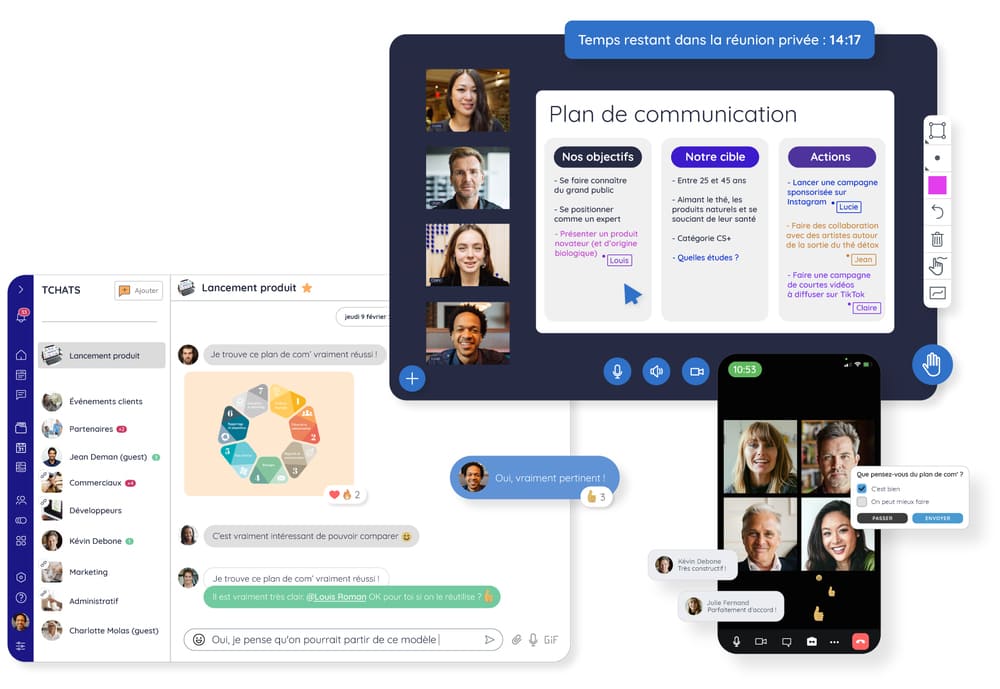
There are now many alternatives to email such as team messaging, the office suite, or the collaboration platform. A genuine all-in-one tool, a collaboration platform lets you exchange information directly in a team chat or over video, cutting down your internal email traffic.
That is the solution chosen by the Biterrois medical imaging center to smooth out communication between its 100 employees, spread across several sites and constantly on the move. Since 2020, the group has replaced its internal emails with Talkspirit, a collaboration platform 100% made in France. The result: “absenteeism has fallen by 35% and we have cut scheduling errors by 50%”, says Jean-Baptiste Esclafit, Administrative Director.
Read also: Putting an end to internal emails with Talkspirit: the IM du Biterrois case study
6. Train and Raise Employee Awareness
To secure your workstations, the most important thing is of course to raise employee awareness on a regular basis.
Training Workshops: The First Line of Cyber Risk Prevention
Running training workshops is a way to share security best practices with employees, and to explain the risks that certain habits can create.
For instance, you can make them aware of how important it is not to open attachments sent in fraudulent emails, and not to download applications that the IT department has not approved (a habit also known as shadow IT).
Alain Posty, Head of IT and Digital Development at CNPF, reports “having recently launched a cybersecurity awareness program, which is mandatory for anyone who wants to work remotely. Webinar-style training sessions are held every quarter to make employees aware of best practices, in particular the things they should watch out for when they open an email.”
It is also important to raise employee awareness of the GDPR and data protection. Johnny Cervantes reports “communicating regularly with employees on this issue, and giving them best practices to protect their data better”. He also “encourages employees to train themselves so that they can make customers aware of GDPR issues.”
To get your message across, try to illustrate this training with concrete examples. Nicolas Bour, CIO of Aiguillon Construction, reports “communicating regularly about the problems faced by companies in the same sector that have suffered cyberattacks.”
Do not hesitate to use different formats, video in particular, to make your training more interactive. At Doctolib, for example, “an e-learning module bringing together several podcasts and videos on security helps raise employee awareness”.
Role Play, to Learn by Example
To check that your employees have taken the training on board, try to test their knowledge regularly, for example by running fake phishing campaigns, that is, by simulating the phishing campaigns real hackers send. Running this kind of initiative regularly makes users more vigilant and reduces the cyber risks linked to phishing.
“Over the coming months, we intend to raise employee awareness through serious games and phishing simulations. The goal is to sharpen employees' critical eye, particularly on email, which is one of the main ways into the information system.” Nicolas Bour, CIO of Aiguillon Construction
Read also: Cybersecurity: 4 Ideas for Raising Employee Awareness
Continuous Training, a “Must” for the IT Department
Finally, do not forget to keep training yourself, for example by following webinars and consulting online resources, in particular on the ANSSI website. “Another good practice is to join a CIO club, such as CLUSIR or Clusif”, in order to discuss the best solutions to put in place and share experience with your peers, advises Laurent Hausermann, IoT Security Engineering Director at Cisco.
*
* *
You now have all the tools you need to secure both the fixed and mobile workstations of your employees.
Want to find out more about the challenges IT departments face in the age of hybrid work? Read the full white paper:
Download the White Paper
This article is an extract from our white paper “Hybrid Work: New Challenges for IT Leaders”. In it you will find: the 3 major challenges facing IT departments in the age of hybrid work; practical advice to speed up your digital transformation, secure your workstations and improve the employee experience, along with the accounts of 10 IT leaders working in companies, public bodies and non-profit organizations.