
4 tips for effective remote team collaboration

.svg)
- Write the communication rules down before anything else: which channel carries which kind of message, and how fast people are expected to answer asynchronously.
- Give more detail than you would in an office, a screen recording included when it helps, because a clarifying question costs half a day when nobody shares a time zone.
- Only call a meeting when it is genuinely needed: 74 percent of employees surveyed by SurveyMonkey say that after a virtual meeting they at least sometimes think it could have been an email.
- Deliberately create the informal moments an office produces on its own: agenda-free video calls, a regular team ritual, a channel for topics that are not work.
- Make roles, decision rights and objectives explicit: remotely, whatever stays implicit is paid for in days of waiting.
- Bring chat, projects, meetings and the knowledge base into one place rather than a stack of apps that do not talk to each other.
Remote work has dramatically increased over the past few years. The Economist Report: Future Workforce report from freelance work platform Upwork projected 36.2 million Americans working remotely by 2025, 16.8 million more workers than before the COVID-19 pandemic. That horizon has come and gone: the question is no longer whether teams will work remotely, but how they organise themselves to do it well.
And with remote work becoming more and more normalized, it’s more important than ever for leaders to find ways to effectively collaborate with their team members, and for those team members to more effectively collaborate with each other, no matter where they may be working.
But how, exactly, do you do that? Let’s take a look at four key tips for more effective remote team collaboration:
Summary
- 1. Prioritize communication
- 2. Make the most out of meetings
- 3. Foster strong relationships with team members
- Before you pick your tools: make roles and decisions explicit
- 4. Use the right tools
1. Prioritize communication
By definition, people working remotely are working in different locations, sometimes in different cities, countries, or time zones. And, as such, remote teams don’t have the luxury of sticking their head into their supervisor or co-worker’s office to ask a quick question. Not only are they not in the same office space as their team, they may not even be in the same country.
Effective and clear communication is always an important part of empowering better team collaboration. But prioritizing communication is even more important for remote team collaboration, when teams may be working asynchronously and across different time zones.
Also read: [Ebook] Future of Work: Make Way for Hybrid Work!
How you communicate with your remote team will dictate, in large part, how successful they are, both individually and collectively. Some things to keep in mind to ensure effective communication (and, as a result, effective collaboration) with remote teams include:
- Set clear communication guidelines. In order for remote teams to communicate effectively, they need clear guidelines around communication. Make sure to clearly outline for your employees how to best communicate with their team members (for example, if they have a question on a project, should they send the question in a chat, or post it to your project management platform?). You’ll also want to outline the “communication chain of command” for if and when they face a problem (for example, if they run into a project-related issue, who do they need to report the issue to, and who can they reach out to and get real-time support?).
- Be extra clear when giving directions. As mentioned, oftentimes, remote teams work asynchronously. If they have a question on a task or assignment, they won’t always be able to ask that question in real time, which can cause productivity to halt. That’s why it’s important to give incredibly clear directions when assigning tasks. Include any supporting information or media that might make your directions more clear (for example, a video documenting how you’d like a certain task completed). Remember, when it comes to giving directions to remote teams, there’s no such thing as too much information or detail. If you feel like you’re over-explaining things, chances are, you’re on track.
- Encourage team members to communicate often. The more remote team members communicate with each other, the better they’ll communicate, so encourage them to communicate often, both in real time (for example, by scheduling one-on-one and/or team video chats) and asynchronously (for example, by sending emails or video/chat messages).
Bottom line? The better and more clearly remote teams communicate, the better they’ll be able to collaborate. So if you want to empower more effective remote team collaboration, make sure communication is at the top of your priority list.
Also read: How to improve internal communication in your company
2. Make the most out of meetings
Meetings are a must for most remote teams. Because you’re not sharing physical space, it’s important to meet, whether to update the team on the status of a project, work through a problem together in real time, or spend time socializing.
But not all meetings are created equal, and if you want your remote team to collaborate with each other, it’s important to make the most of meetings.
So how, exactly, do you do that? Some things to keep in mind to maximize your meetings’ effectiveness, and empower better collaboration and work from your remote team, include:
- Only schedule meetings when they’re necessary. Many remote workers feel like the majority of their meetings are a waste of time. For example, according to a survey from SurveyMonkey, a whopping 74 percent of employees said that, after attending a virtual meeting, they find themselves thinking “this meeting could have been an email” at least some of the time. And it’s not just a waste for employees; a recent report from Otter.ai and organizational psychologist Dr. Steven G. Rogelberg found that organizations could be wasting as much as $100 million dollars on unnecessary meetings each year! Before you schedule a meeting, make sure it’s actually necessary; your team (and your budget) will thank you.
- Keep meetings on topic and within a reasonable time frame. If you decide a meeting is necessary, it’s important to respect your team’s time. Send out an agenda to all team members prior to the meeting that outlines what you’ll be discussing. Then, when the meeting takes place, make sure to keep discussions on topic, and to keep the meeting to a reasonable time frame.
- Record meetings. When you’re working with a remote team, not everyone may be able to attend in real time, particularly if they’re working in a different time zone. Make sure to record your meetings and send them out to your entire team afterwards; that way, every employee understands what was discussed, which will enable them to work better together.
- Send out action items after the meeting. After the meeting, make sure to send out clear action items to every team member that outlines their tasks, who they’ll be collaborating with to complete those tasks, and any additional information they need to complete the tasks successfully.
In most cases, meetings are a must to ensure that your team has the support and information they need to collaborate more effectively. But just remember to make your meetings as streamlined and efficient as possible. That way, your team has the time they need to collaborate with their colleagues and get work done (instead of spending the bulk of their working hours in meetings).
Also read: The Right Way to Run Hybrid Meetings by Toptal
3. Foster strong relationships with team members
One of the foundations of effective collaboration, whether working together in person or remotely, is relationships. When employees feel like they have a solid, trusting relationship with their colleagues, they collaborate more effectively.
Which is why, if you want to enable more effective team collaboration, you need to help foster those strong relationships with your remote team members.
There are a variety of ways to foster better relationships with your remote team members, including:
- Carve out time for team members to get to know each other. Because remote teams aren’t working in the same space, there aren’t opportunities for them to spontaneously connect and chat, for example in the company kitchen or by the water cooler. That’s why, as a leader, if you want them to have stronger relationships? You need to create those opportunities. If you have team members that are going to be collaborating on a project, set up time for them to connect over video chat and get to know each other. If you want to foster stronger relationships across your entire team, host weekly team events, like a virtual game night, to give everyone the opportunity to socialize. The better your team gets to know each other, the more they will trust each other and the better they’ll work together, so make sure to be intentional in creating space for them to get to know each other.
- Connect on things other than work. In addition to creating opportunities for your team to connect, you should also try to create opportunities for them to connect about things other than work. For example, you might start a chat channel for employees to share pictures of their pets or discuss their favorite TV show. Again, this can create a more personal connection that strengthens relationships and bonds your team together, all of which will enable better collaboration.
- Create a work environment that values openness and honesty. Trust is an important part of any relationship, including relationships within your remote team. That’s why building a work environment where people feel they can speak openly and honestly is a must. And the way to do that? Lead by example. If a problem arises, address it openly. Encourage respectful feedback. Reward remote team members when they share honestly and openly. That kind of environment fosters trust, and that trust fosters better relationships and better remote team collaboration.
Before you pick your tools: make roles and decisions explicit
The four tips above all rest on the same assumption: that everyone knows what they have to do, and who decides when a decision is needed. In an office, that vagueness gets sorted out in a corridor. Remotely, it is paid for in days of waiting.
Remote teams that hold up over time are not the ones that communicate the most, but the ones that have written down what stays implicit elsewhere: the scope of each role, the autonomy that comes with it, and how a decision gets taken when not everyone is available at the same moment.
- Write down roles, not just job titles. A job title does not say who reviews a quote or who approves a release. A role does: it carries a scope, accountabilities and a right to decide. At Semawe, that clarity is what made faster decisions possible.
- Separate what is decided alone from what is decided after consultation. Routing everything through the manager creates a bottleneck, and the kind of decision fatigue that ends up slowing the whole team down.
- Make objectives visible. Remotely, nobody sees what anyone else is working on. Team objectives everyone can open replace the sync points you can no longer improvise on the way to the coffee machine.
- Leave a trace of every decision. A decision taken on a video call and written down nowhere does not exist for anyone who was not connected. Minutes are not paperwork: they are what makes asynchronous work possible.
This ground is not reserved for self-managing organisations, but they are the ones who have documented it furthest: see Setting up a self organising remote team, and, on the research side, the impact of self-leadership and shared leadership on the performance of virtual teams.
| What has to be explicit | The question to settle | Where it lives |
|---|---|---|
| What has to be explicitChannels | The question to settleWhich information goes to chat, to the project board, to a video call or to email? | Where it livesA shared communication charter |
| What has to be explicitResponse times | The question to settleHow long before someone answers an asynchronous message? | Where it livesThe same charter, reread by every new joiner |
| What has to be explicitRoles | The question to settleWho owns what, and who does not have to worry about it? | Where it livesA role map kept up to date |
| What has to be explicitDecisions | The question to settleWho decides alone, who decides after consultation, who is simply informed? | Where it livesThe minutes of the meeting where the decision was taken |
| What has to be explicitGoals | The question to settleWhat will the quarter be judged on? | Where it livesTeam objectives everyone can see |
| What has to be explicitConnection | The question to settleWhich moments exist outside of work topics? | Where it livesA ritual booked in the shared calendar |
4. Use the right tools
The tips we discussed so far will go a long way in empowering better remote team collaboration. But arguably the most important thing you need to give your remote team in order for them to collaborate successfully?
The right tools.
Talkspirit is an all-in-one work platform that empowers remote teams to do their best work. Talkspirit has all the features remote teams need to more effectively collaborate, including video conferencing; team and one-on-one chat; a project management platform; an internal drive that allows employees to collaborate on documents, spreadsheets, and slides in real time; knowledge management and sharing tools, and much more.
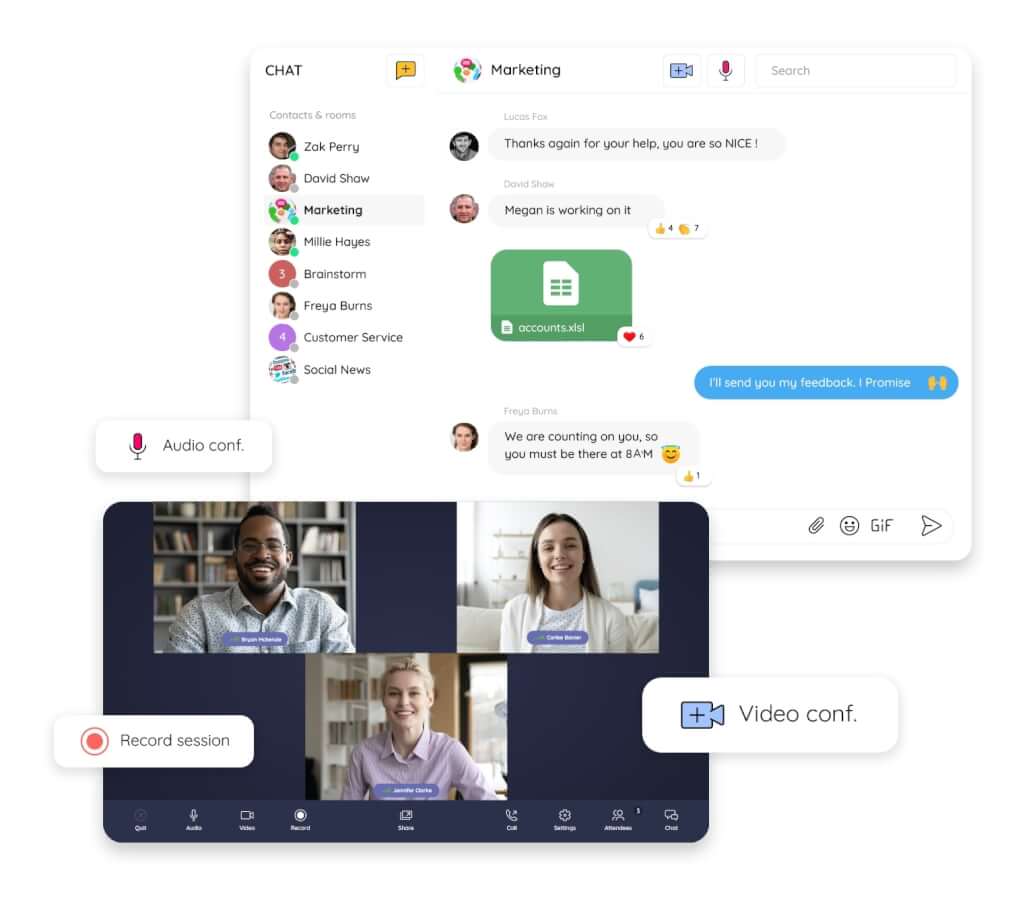
If you want to give your team the tools they need to collaborate more effectively, no matter where they’re working? Talkspirit can help: book a demo, or talk to an expert to open a free trial.
–
By Deanna de Bara
FAQ
Sort decisions into three cases: what a role holder decides alone, what is decided after consulting the people affected, and who is simply informed. Then leave a trace of every decision in minutes the whole team can open, otherwise it does not exist for anyone who was not connected.
Clearly outline how employees should communicate with their team members, for example whether a project question goes into a chat or onto the project management platform. Also outline the communication chain of command for when they face a problem: who to report an issue to, and who can give real-time support.
Remote teams often work asynchronously and can't always ask a question in real time, which can cause productivity to halt. Include any supporting information or media that makes your directions clearer, such as a video documenting how a task should be completed; there's no such thing as too much information or detail.
Not all of them. According to a survey from SurveyMonkey, 74 percent of employees said that after attending a virtual meeting they find themselves thinking this meeting could have been an email at least some of the time. A report from Otter.ai and organizational psychologist Dr. Steven G. Rogelberg found that organizations could be wasting as much as 100 million dollars on unnecessary meetings each year.
Only schedule meetings when they're necessary. Send out an agenda to all team members prior to the meeting, keep discussions on topic and within a reasonable time frame, record meetings for those in other time zones, and send out clear action items afterwards.
Create the opportunities that a shared office would provide: set up time for collaborators to connect over video chat, host weekly team events such as a virtual game night, start a chat channel for non-work topics, and build an environment that values openness and honesty by leading by example.



.webp)